
Detect unauthorized Windows registry changes before they become incidents.
XDRShield Registry Key Monitoring rules define which Windows registry keys and values should be watched for create, modify, and delete activity so security and IT teams can detect unauthorized or unexpected registry changes, review drift, and connect registry-change evidence to alerts, cases, and investigation workflows.
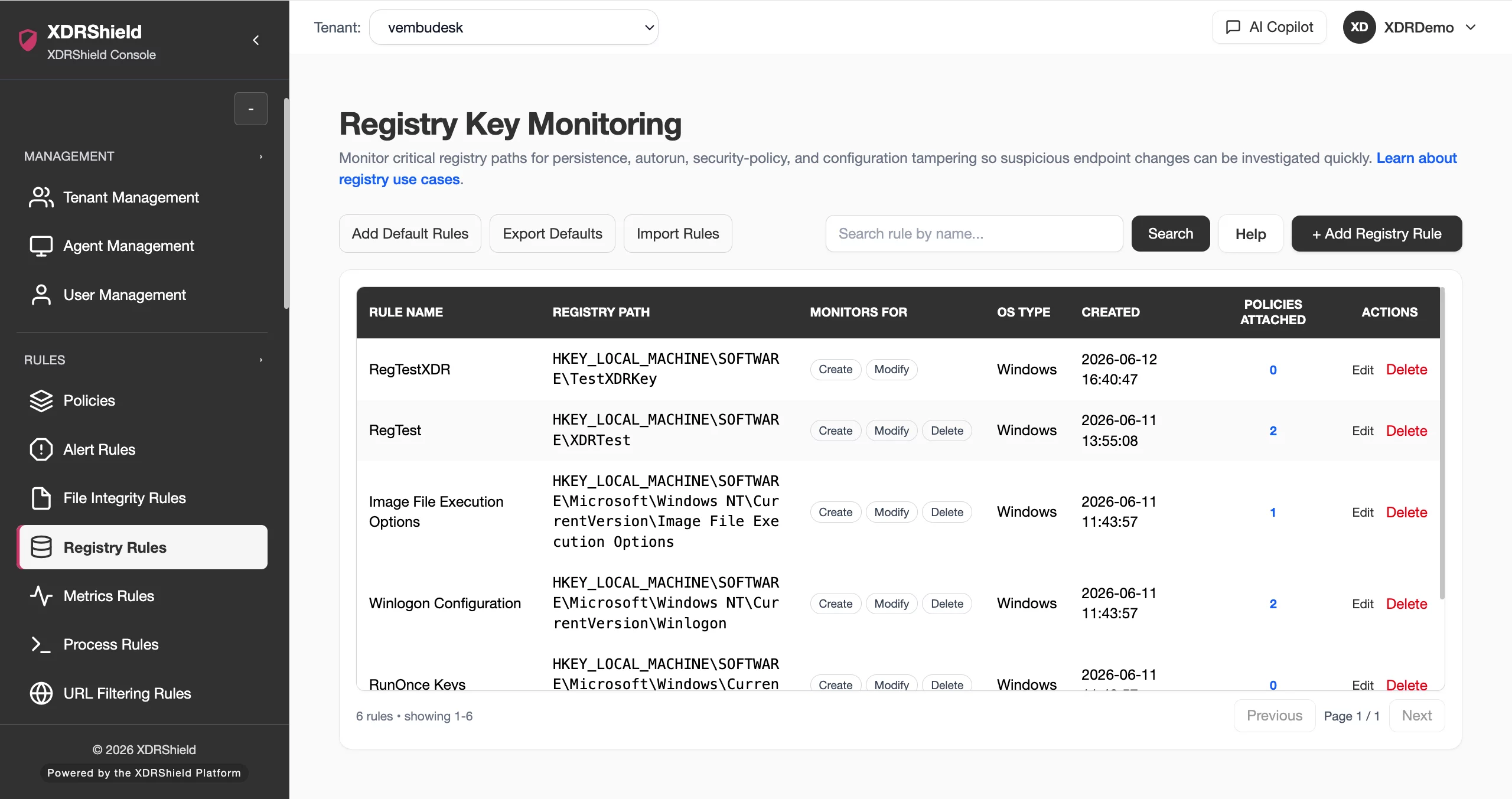
Registry changes are often the first visible signal of persistence, tampering, or operational drift.
Unauthorized changes to Windows registry keys and values can indicate persistence mechanisms, system configuration tampering, browser hijacking, or accidental drift. Registry monitoring rules make those changes visible, reviewable, and connectable to investigation and response workflows.
Define what to watch, attach rules to policies, and review drift with full context.
Registry rules are reusable monitoring definitions. Each rule specifies the Windows operating system scope, the registry keys and values to watch, and the registry actions to detect. Rules attach to endpoint policies for agent enforcement, and detected changes become reviewable drift events with endpoint, tenant, timestamp, and policy context.
- Create reusable registry rules with Windows OS scope, watched keys, and action coverage.
- Attach rules to endpoint policies for agent-enforced monitoring.
- Review detected changes as drift events with baseline, endpoint, and ownership context.
- Classify drift as approved or unapproved and connect unapproved changes to investigation.
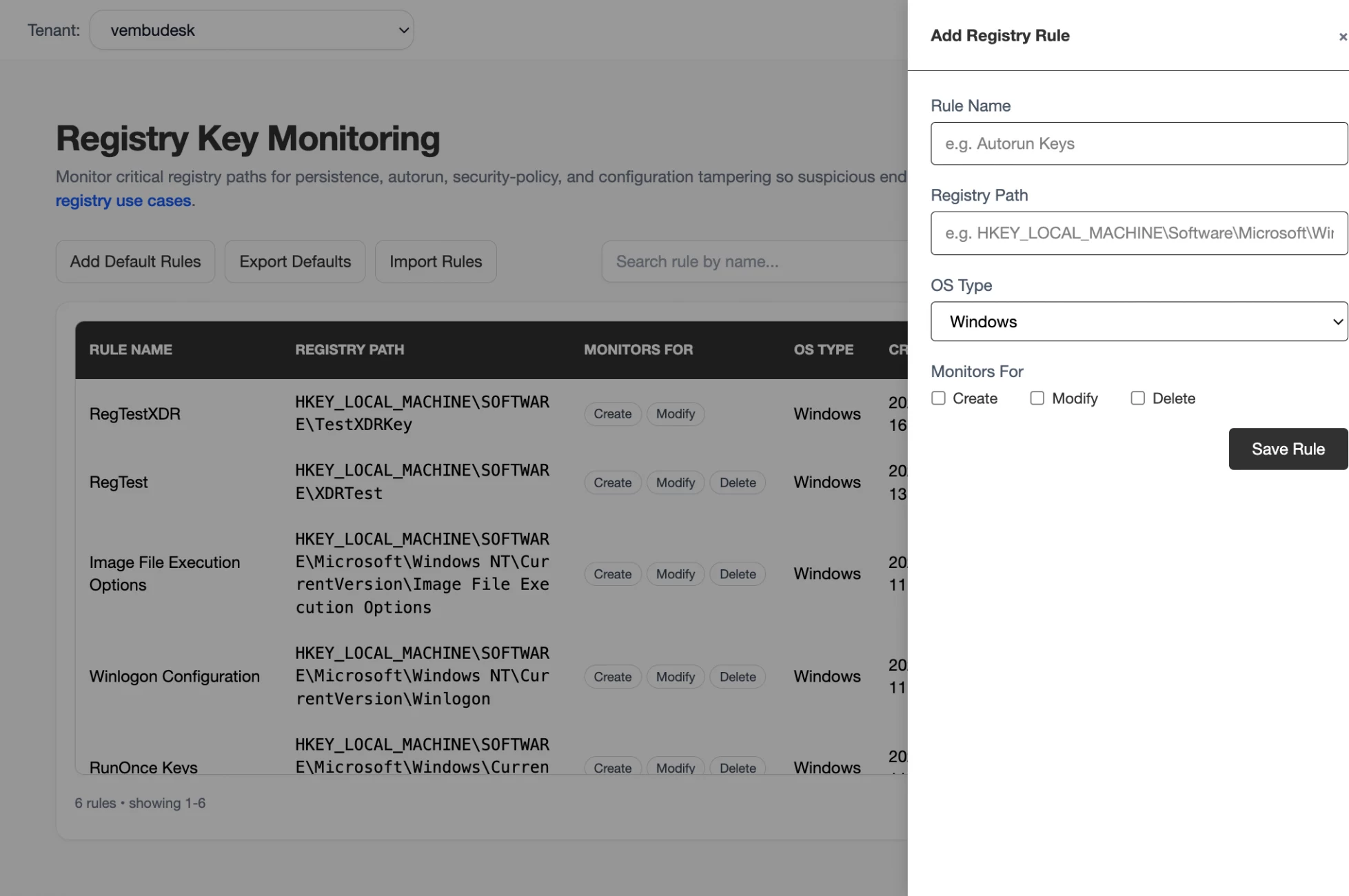
What XDRShield Registry Key Monitoring helps teams do.
Each capability supports a part of the registry-change monitoring workflow, from rule creation and key selection to drift review, investigation linkage, and compliance evidence.
Rule creation and key selection
Create reusable registry rules that specify the Windows operating system scope, watched registry keys or value patterns, and the registry actions to monitor.
Registry action coverage
Monitor create, modify, and delete activity on watched registry keys and values so every relevant registry change is captured by the agent.
Policy-based enforcement
Attach registry rules to endpoint policies for agent-enforced monitoring across tenant-scoped Windows endpoints.
Persistence mechanism detection
Detect registry-based persistence including Run keys, services, scheduled tasks, Winlogon, and browser helper objects before attackers establish a foothold.
Drift detection and review
Review detected registry changes as drift events with baseline state, endpoint identity, timestamp, and ownership context.
Alert and event correlation
Connect registry change events to security alerts, event triage, and case workflows so registry changes are not reviewed in isolation.
Investigation and case linkage
Move from a registry event into threat hunting, case ownership, timelines, and governed response with full evidence context.
Compliance and audit evidence
Preserve reviewed registry change records with reviewer, decision, timestamp, and supporting evidence for compliance and audit workflows.
From rule creation to drift review and investigation.
A strong registry monitoring workflow keeps rule design, policy assignment, drift review, and investigation connected so registry changes are detected, classified, and acted on consistently.
Review existing rules
Check current registry rules before creating new ones to avoid duplicates and keep scope clear.
Define focused keys
Use exact registry key paths and value names that match the monitoring scope and Windows OS.
Choose action coverage
Select create, modify, and delete actions to monitor based on the risk and change model.
Test before rollout
Validate rules on a small set of endpoints before assigning them broadly through policies.
Assign through policies
Map stable registry rules into endpoint policies for agent-enforced monitoring across tenants.
Review and classify drift
Review detected changes, classify as approved or unapproved, and escalate unapproved drift into investigation.
Where Registry Key Monitoring helps most.
Use registry monitoring where unauthorized registry changes can create security, compliance, or operational risk.
Persistence mechanism detection
Monitor Run and RunOnce keys, services, Winlogon, Explorer policies, and scheduled task registry entries for attacker persistence.
Browser and application hijacking
Watch browser helper objects, shell extensions, file associations, and application registry settings for unauthorized modification.
System configuration tampering
Detect changes to security settings, UAC configuration, Windows Defender settings, and firewall rules stored in the registry.
Compliance and change control
Map registry rules to compliance controls, review changes with ownership, and preserve evidence for regulated Windows environments.
Change control validation
Confirm whether sensitive registry changes happened inside approved maintenance windows or require follow-up review.
MSP multi-tenant governance
Standardize registry monitoring policies across customers while keeping tenant-specific rules, review queues, and audit trails separate.
Drift separates expected changes from unexpected risk.
Drift means a monitored registry key or value no longer matches the known or expected state for that endpoint. It helps operators separate normal approved changes from unexpected, risky, or unauthorized changes.
Trusted reference
From detection to decision
Registry monitoring for security, infrastructure, and compliance teams.
The same registry-change evidence supports different decisions. XDRShield keeps rule context, drift review, and audit history usable without losing tenant scope or operational responsibility.
For SOC and investigation teams
Use registry events to detect suspicious changes, correlate with alerts and process activity, and escalate unapproved drift into hunts, cases, and governed response.
- Connect registry changes to alerts, events, and case timelines.
- Review drift with endpoint, policy, and baseline context.
- Escalate unapproved changes into investigation and response.
For MSP and IT operations teams
Standardize registry monitoring policies across managed environments while keeping tenant-specific rules, review queues, and audit trails separated by customer.
- Apply consistent registry rules across customers and tenants.
- Keep tenant-specific drift review and audit history separate.
- Use policy assignment for controlled rollout and coverage.
Registry Key Monitoring FAQs.
What is Registry Key Monitoring in XDRShield?
Registry Key Monitoring rules define which Windows registry keys and values should be watched for create, modify, and delete activity so teams can detect unauthorized or unexpected registry changes, review drift, and connect registry-change evidence to alerts, cases, and investigation workflows.
How do registry rules connect to endpoint policies?
Registry rules are reusable monitoring definitions that attach to endpoint policies for agent-enforced monitoring on Windows endpoints. The agent on each endpoint knows which registry keys to watch and which actions to report.
What registry changes should I monitor?
Common high-value targets include Run and RunOnce keys, services, Winlogon, scheduled task registry entries, browser helper objects, shell extensions, security settings, UAC configuration, Windows Defender settings, and firewall rules. Rules should be tested before broad rollout.
Can registry events be connected to investigation workflows?
Yes. Registry change events can be correlated with security alerts, event triage, threat hunting, case timelines, and governed response so registry changes are not reviewed in isolation.
How does registry monitoring support MSP operations?
MSP teams can standardize registry monitoring policies across customers while keeping tenant-specific rules, drift review queues, and audit trails separated by customer, tenant, and workspace scope.
Monitor registry changes, review drift, and connect evidence to investigation.
Use XDRShield Registry Key Monitoring to detect unauthorized registry changes, classify drift, support compliance, and connect registry-change evidence to alerts, cases, and governed response.












