
Monitor endpoint protection status and track malware findings across every managed endpoint.
XDRShield Antivirus Integration and Findings collects protection status, threat detection results, remediation outcomes, and endpoint protection health from Windows Defender and third-party AV solutions so teams can verify coverage, correlate AV detections with XDR events, and investigate malware incidents with full evidence context.
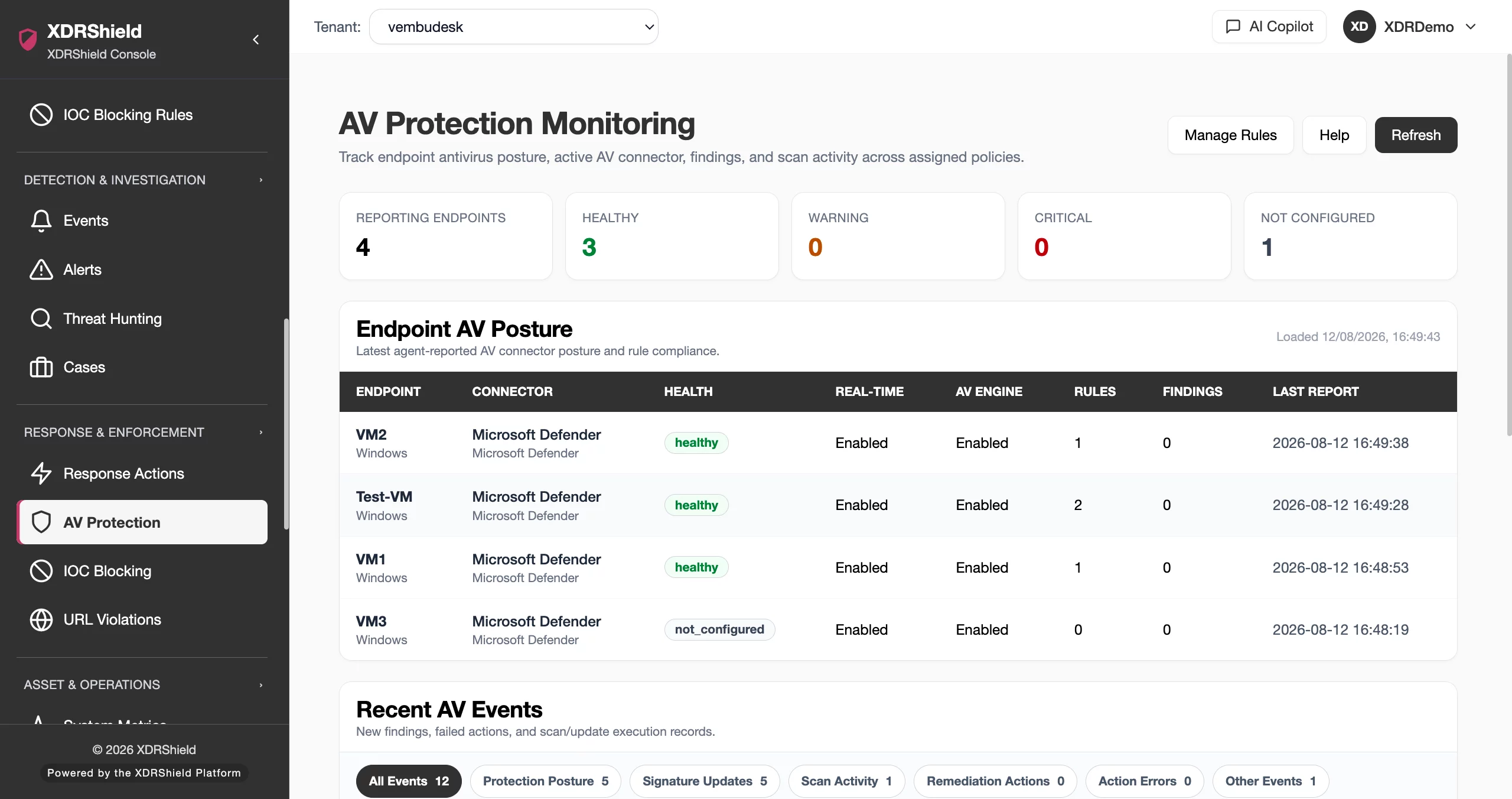
Unprotected or misconfigured endpoints are the most common entry point for malware and ransomware.
When antivirus is disabled, signatures are stale, or remediation fails, endpoints become vulnerable. AV integration monitoring makes protection posture visible, tracks what was detected and what happened, and connects AV findings to investigation workflows.
Collect AV posture, detection findings, and remediation outcomes into a unified monitoring view.
AV protection rules define what to monitor: protection posture, signature freshness, scan requirements, and remediation behavior. Rules attach to endpoint policies for agent enforcement, and the agent reports AV connector status, health state, findings, and events back to the tenant-scoped monitoring view.
- Create AV protection rules with connector selection, posture requirements, and scan scheduling.
- Attach rules to endpoint policies for agent-enforced monitoring across managed endpoints.
- Review endpoint AV posture with health state, real-time protection, engine status, and signature age.
- Track detection findings, remediation outcomes, and protection events with tenant and endpoint context.
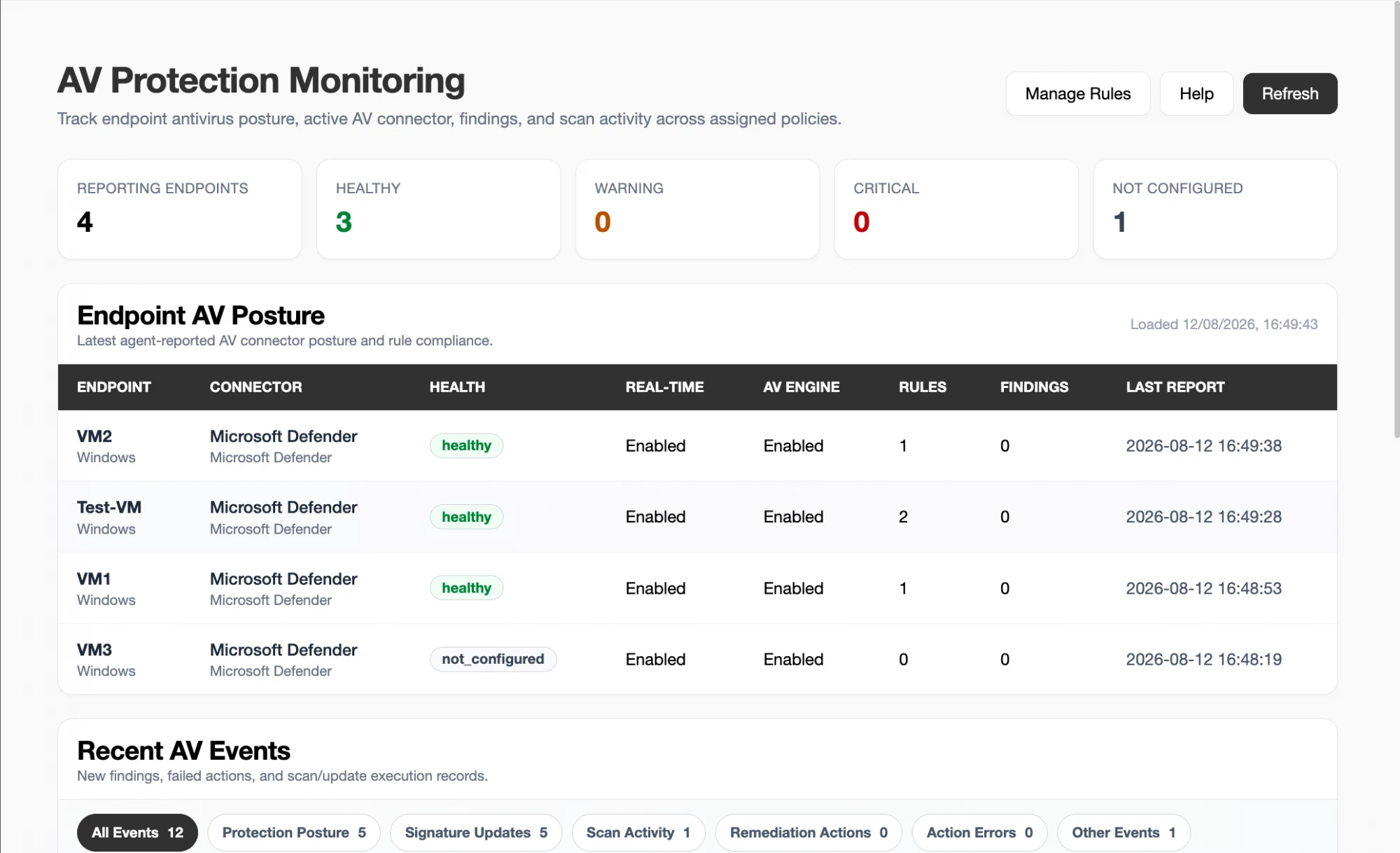
What XDRShield Antivirus Integration and Findings helps teams do.
Each capability supports a part of the AV monitoring workflow, from integration status and posture validation to threat detection, remediation tracking, and investigation linkage.
AV integration status
Monitor connected, disabled, or missing AV connectors across endpoints with support for Windows Defender and third-party antivirus products through the AV connector framework.
Threat detection findings
Track malware detections with threat name, severity, type, and file path so every finding is visible, reviewable, and connectable to investigation workflows.
Remediation tracking
Follow remediation outcomes for each detection including quarantined, removed, blocked, or no-action so teams know what happened and what still needs attention.
Protection health monitoring
Verify real-time protection status, AV engine availability, signature update age, and scan state across managed endpoints with health-state classification.
Alert and event correlation
Connect AV detection events to security alerts, process monitoring, file integrity, and network events so malware detections are investigated with full context.
Investigation and case linkage
Move from an AV finding into threat hunting, case ownership, timelines, and governed response with full evidence context and remediation history.
Policy-based collection scoping
Attach AV protection rules to endpoint policies for tenant-scoped coverage, with connector selection, posture requirements, and remediation mode.
Compliance and audit evidence
Preserve AV posture, detection, and remediation records with endpoint, timestamp, and action context for compliance and audit workflows.
From rule creation to posture monitoring and investigation.
A strong AV monitoring workflow keeps rule design, policy assignment, posture review, detection tracking, and investigation connected so endpoints stay protected and findings are acted on consistently.
Review existing rules
Check current AV protection rules before creating new ones to avoid duplicates and keep scope clear.
Choose connector and posture
Select Auto-detect for vendor-neutral posture or Microsoft Defender for deep scan and remediation actions. Set real-time protection and signature freshness requirements.
Configure scan and remediation
Choose quick, full, or custom scan schedules and set remediation mode from alert-only to quarantine or removal with approval.
Start in monitor mode
Begin in Monitor mode to observe posture and findings without applying disruptive remediation actions.
Assign through policies
Map AV protection rules into endpoint policies for agent-enforced monitoring across tenants and managed endpoints.
Review and investigate
Monitor endpoint AV posture, track detection findings and remediation outcomes, and escalate suspicious detections into investigation and response.
Where AV integration monitoring helps most.
Use AV protection monitoring where endpoint protection status, detection tracking, and remediation visibility are operational requirements.
Endpoint protection verification
Verify real-time protection is enabled, AV engines are healthy, and signatures are current across all managed endpoints.
Unprotected endpoint detection
Identify endpoints with disabled real-time protection, outdated signatures, or missing AV connectors that may be at risk.
Detection and event correlation
Correlate AV detections with process, file, and network events to investigate malware incidents with full endpoint context.
Remediation outcome tracking
Track whether detected threats were quarantined, removed, blocked, or left without action across managed endpoints.
MSP multi-tenant visibility
Monitor per-customer AV posture with tenant-scoped protection health, detection findings, and remediation status.
Compliance evidence collection
Preserve AV deployment, posture, and remediation records to support antivirus and EDR compliance requirements.
AV monitoring for security, infrastructure, and MSP teams.
The same AV protection evidence supports different decisions. XDRShield keeps rule context, posture health, and detection history usable without losing tenant scope or operational responsibility.
For SOC and investigation teams
Use AV detection events to investigate malware incidents, correlate findings with alerts and process activity, and escalate detections into hunts, cases, and governed response.
- Connect AV findings to alerts, events, and case timelines.
- Review detections with endpoint, policy, and remediation context.
- Escalate suspicious detections into investigation and response.
For MSP and IT operations teams
Standardize AV protection policies across managed environments while keeping tenant-specific posture, detection findings, and remediation status separated by customer.
- Apply consistent AV rules across customers and tenants.
- Keep tenant-specific posture and detection history separate.
- Use policy assignment for controlled rollout and coverage.
Antivirus Integration and Findings FAQs.
What is Antivirus Integration and Findings Monitoring in XDRShield?
AV integration monitoring collects protection status, threat detection findings, and remediation results from endpoint antivirus and EDR solutions so teams can verify protection coverage, correlate detections with XDR events, and investigate malware incidents with full context.
What AV and EDR solutions does XDRShield integrate with?
XDRShield integrates with Windows Defender and supported third-party antivirus solutions to collect integration status, detection events, signature health, and remediation outcomes into a unified monitoring view.
What AV findings can be tracked?
Teams can track malware detections with threat name, severity, file path, and action taken (quarantined, removed, blocked), plus protection health signals including real-time protection status, signature update age, and scan state.
Can AV findings be connected to investigation workflows?
Yes. AV detection events can be correlated with security alerts, process monitoring, file integrity events, threat hunting, case timelines, and governed response so malware incidents are investigated with full evidence context.
How does AV monitoring support MSP operations?
MSP teams get per-customer AV posture visibility with protection health across managed endpoints, tenant-specific alert thresholds, and separated audit trails across customers, tenants, and workspaces.
Monitor AV posture, track findings, and connect evidence to investigation.
Use XDRShield Antivirus Integration and Findings to verify endpoint protection, track malware detections and remediation, and connect AV evidence to alerts, cases, and governed response.












