
Route security and operational notifications to the right people with clear scope and priority.
XDRShield Notification Settings helps teams configure alert delivery, operational notifications, recipient scope, and review expectations so important security, health, policy, and service signals reach the right owners without creating unnecessary noise.
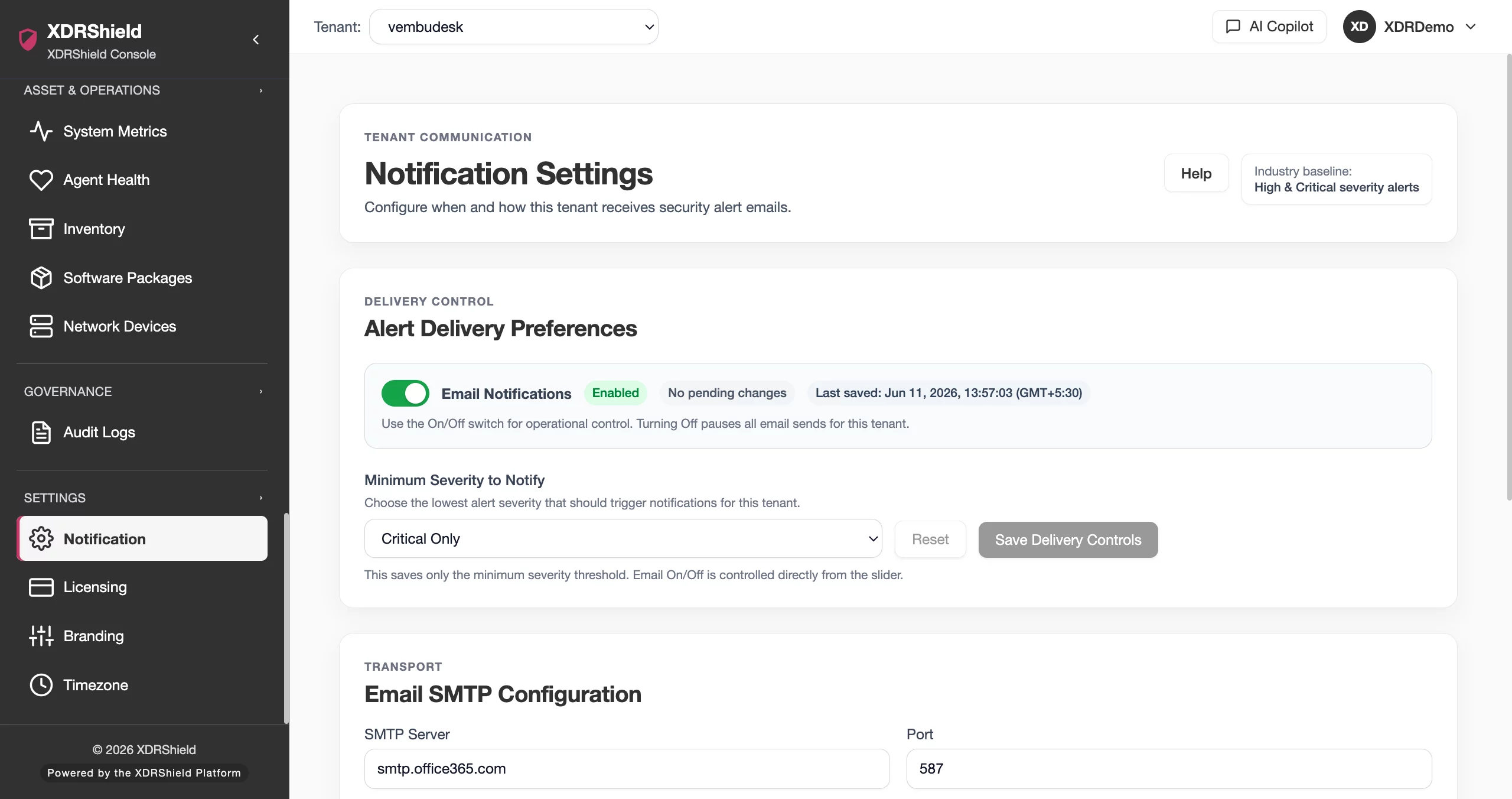
Notifications must create action, not just more noise.
Security teams need important alerts and operational signals to reach the right people quickly, while routine or low-value messages should not overwhelm owners. Notification Settings connects signal type, severity, recipient, tenant scope, and review workflow.
Configure notification routing around ownership, severity, and tenant context.
Notification Settings should be used to align signal delivery with how teams actually work. Administrators can define who receives what type of notification, validate tenant or customer scope, and use alert/case workflows to confirm that notifications result in action.
- Configure recipient groups or addresses according to security and operations ownership.
- Align notification conditions with severity, workflow, and tenant/customer scope.
- Validate delivery expectations when alerts, cases, health, or policy changes need follow-up.
- Review notification settings when teams report missed signals or excessive noise.
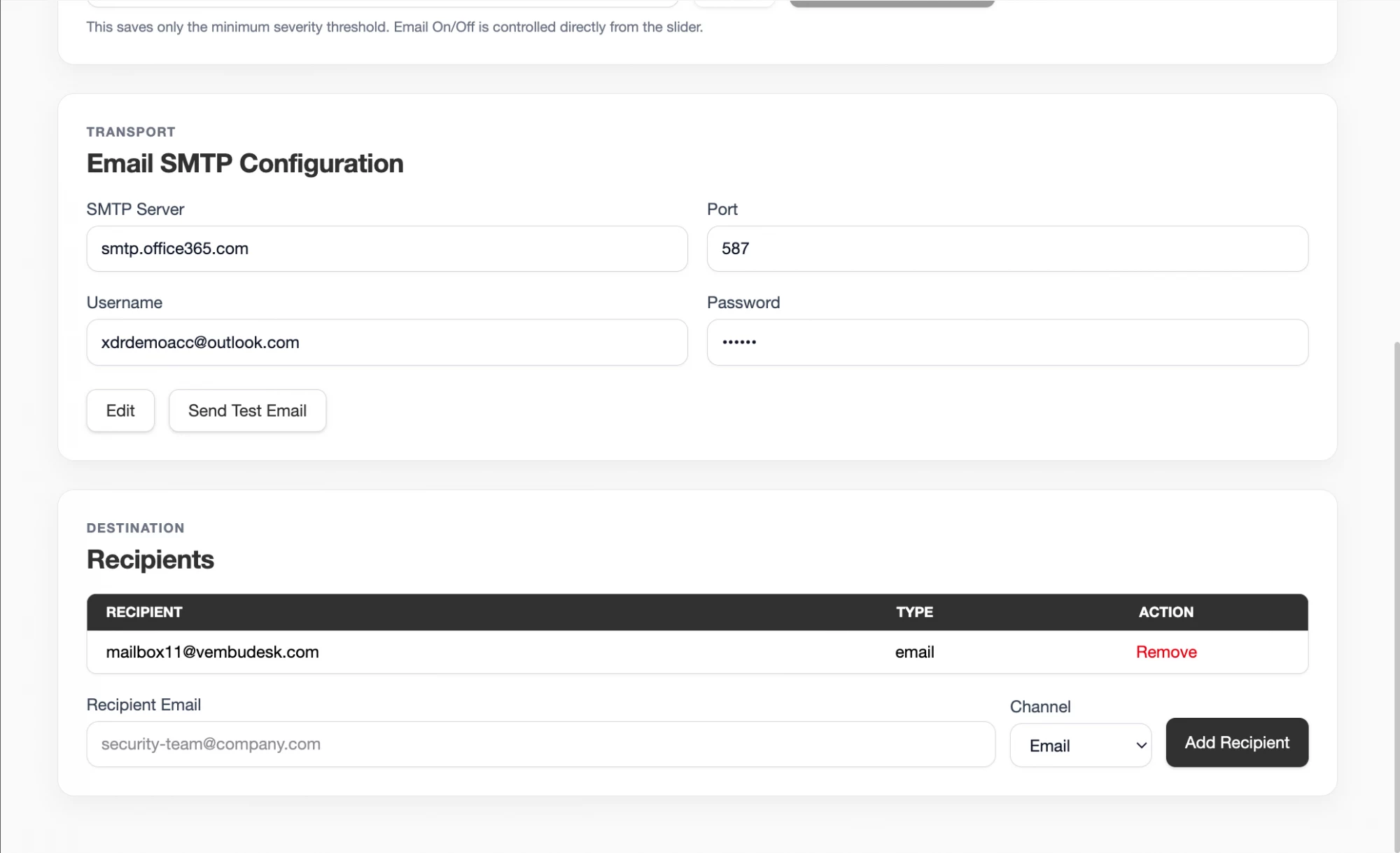
What XDRShield Notification Settings helps teams do.
Each capability supports the operating workflow for notification settings, from configuration and validation to governance, response, and follow-up.
Signal and severity routing
Route important alerts or operational signals according to priority and ownership.
Recipient configuration
Manage notification recipients, groups, or delivery settings where supported.
Tenant-aware delivery
Keep customer-specific notifications aligned to the right service owners.
Escalation timing
Review notification timing expectations for response and service workflows.
Noise investigation
Use alert volume, cases, and activity context to tune noisy notification patterns.
Configuration evidence
Use activity logs to understand who changed notification settings and when.
Workflow handoff
Connect notifications to alerts, cases, health, vulnerabilities, and customer reviews.
Sensitive signal control
Ensure high-risk alerts and response-related signals go to authorized owners.
From notification requirement to reliable routing.
A clear workflow helps teams avoid both missed alerts and noisy channels.
Define ownership
Identify who should receive each signal type and who can act on it.
Map severity and workflow
Decide which alerts, cases, health, policy, or report signals should notify.
Set recipient scope
Configure recipients within the intended tenant, customer, or operations team.
Validate delivery expectations
Trigger or review representative events to confirm routing behavior.
Tune noise
Adjust low-value or repetitive notifications based on operational feedback.
Audit changes
Review notification configuration changes when missed or unexpected messages occur.
Where Notification Settings helps most.
Use Notification Settings when signal delivery affects response time, service quality, or team focus.
Critical alert routing
Ensure high-priority security alerts reach the right analysts or owners.
Escalation support
Align case and SLA follow-up with notification expectations.
Operational health awareness
Route health or deployment issues to operations owners.
Noise reduction
Tune repetitive low-value notifications that distract teams.
Audit and accountability
Review who changed routing and recipient configuration.
MSP service routing
Send customer-specific notifications to the correct service team.
Route by actionability, not volume.
This table helps teams decide what should notify whom.
| Area | What it means | How teams use it |
|---|---|---|
| Critical security signal | High-risk alert, response issue, or urgent case update. | Route immediately to authorized security owners. |
| Operational health signal | Agent, policy, deployment, or service health issue. | Route to IT or service operations owners. |
| Customer/service signal | Tenant-specific issue or reporting workflow. | Route to the responsible MSP/customer team. |
| Low-value repeated signal | Expected or noisy recurring notifications. | Tune, summarize, or route differently to reduce fatigue. |
Notification Settings for security, IT, and MSP teams.
Notification Settings supports day-to-day operations while keeping tenant scope, evidence, and accountable change control clear.
For security and IT teams
Use this feature to keep administrative control, endpoint policy behavior, and operational evidence aligned with the intended environment.
- Validate tenant and user scope before changes.
- Review related logs, alerts, and settings before broad action.
- Use cases, audits, and operations health for follow-up evidence.
For MSP and service-provider teams
Use tenant-aware administration so customer environments stay separated while configuration patterns remain repeatable.
- Confirm customer or tenant scope before bulk changes.
- Standardize controls without mixing customer data.
- Preserve evidence for customer-facing service reviews.
Notification Settings FAQs.
What are Notification Settings in XDRShield?
Notification Settings help configure how security and operational signals are routed to recipients or teams based on workflow, priority, and scope.
How should notification recipients be chosen?
Recipients should match ownership, response authority, tenant/customer responsibility, and sensitivity of the signal.
How can notification noise be reduced?
Review alert volume, repetitive signals, severity, and recipient scope, then tune routing so only actionable messages reach urgent channels.
How do notifications support MSPs?
MSPs can route customer-specific alerts or operational notifications to the responsible service team while preserving tenant scope.
What should be checked when notifications are missed?
Review recipient settings, tenant scope, signal type, severity conditions, delivery expectations, and activity logs for recent configuration changes.
Tune notifications so security and operations teams can act quickly.
Use XDRShield Notification Settings to route important signals, reduce noise, and preserve tenant-aware notification governance.












