
Create, govern, and operate tenant boundaries for secure multi-customer XDRShield operations.
XDRShield Tenant Management helps administrators manage tenant lifecycle, access boundaries, customer/workspace separation, configuration scope, and operational evidence so multi-tenant security work stays controlled and accountable.
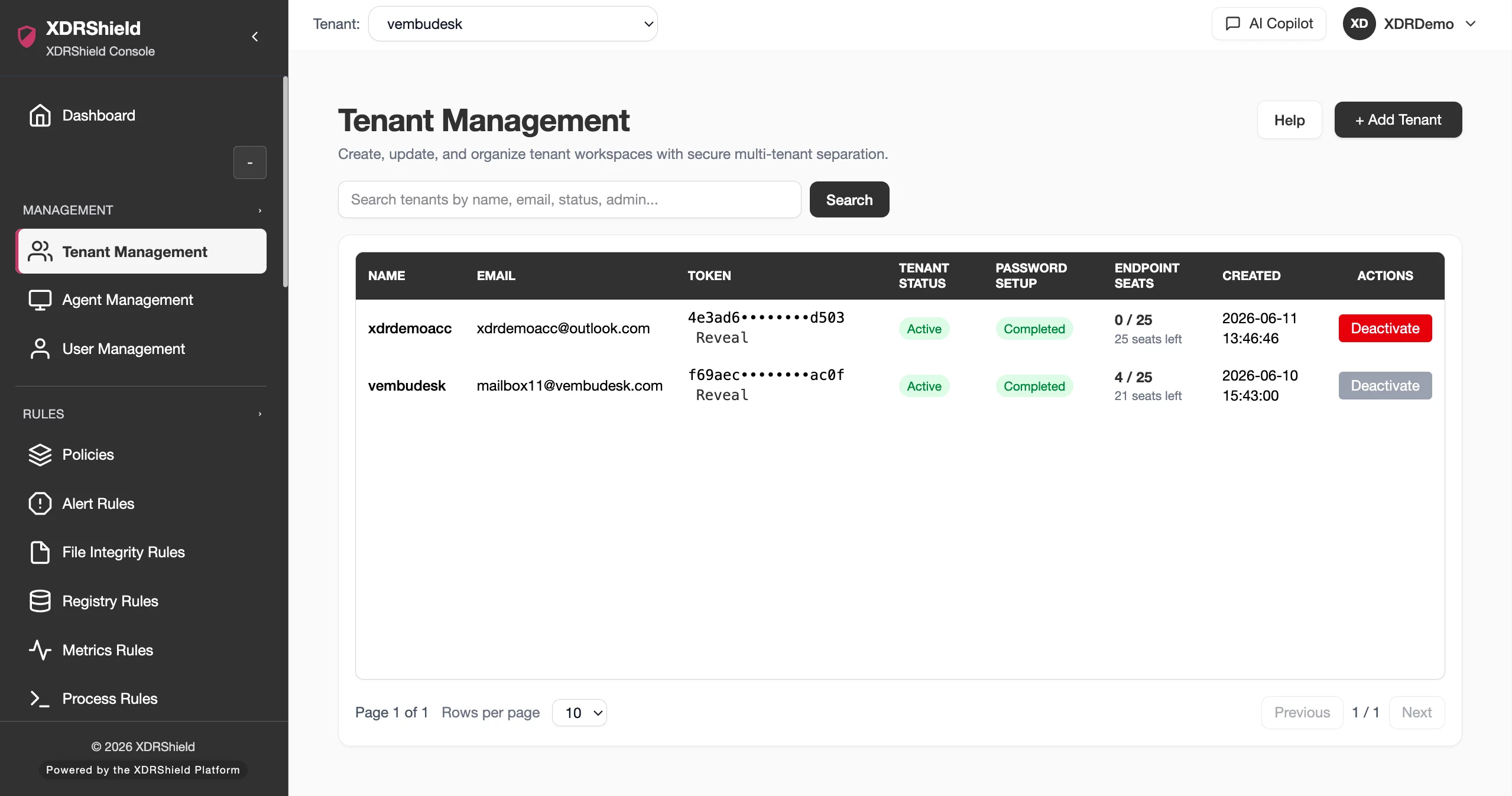
Tenant boundaries are the control layer for multi-customer security operations.
MSP and multi-organization teams need a reliable way to separate customers, users, endpoints, policies, alerts, cases, and evidence. Tenant Management keeps operational scope explicit so teams can onboard, govern, review, and troubleshoot without cross-tenant mistakes.
Use tenant scope as the foundation for every security workflow.
Tenant Management structures the operational boundary that other workflows depend on. It supports customer setup, tenant review, user/access alignment, policy and endpoint scope, and the evidence needed to confirm who changed what inside which customer context.
- Create and maintain tenant records for customer or workspace separation.
- Validate selected tenant before reviewing endpoints, alerts, cases, policies, or reports.
- Coordinate tenant setup with customer management, user access, branding, policies, and deployment workflows.
- Use activity logs and tenant-scoped evidence for audit and service accountability.
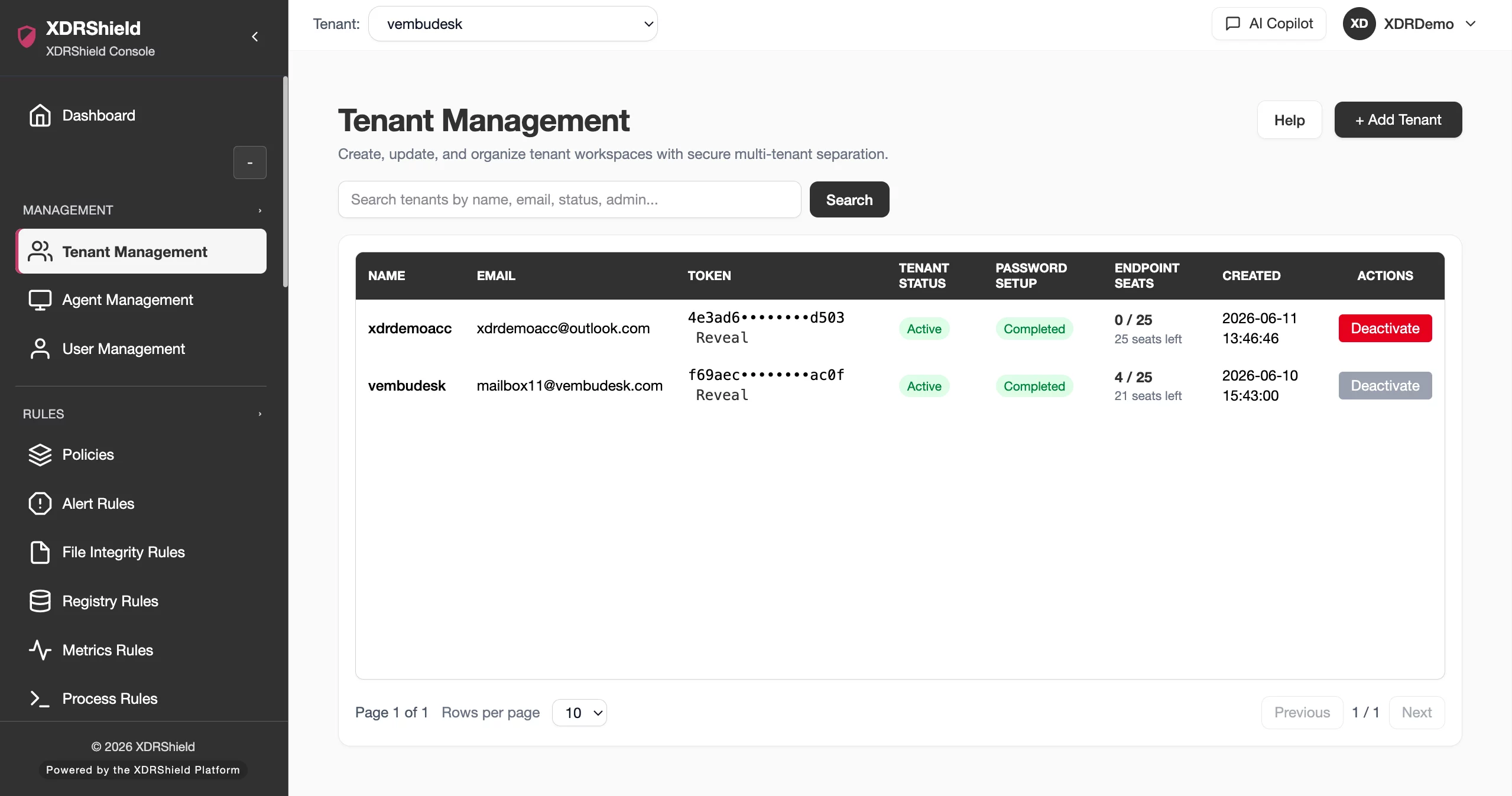
What XDRShield Tenant Management helps teams do.
Each capability supports the operating workflow for tenant management, from review and prioritization to action, governance, and follow-up.
Tenant lifecycle control
Create, review, and maintain tenant or workspace boundaries for customer-separated operations.
Access-scope governance
Keep administrative access aligned to the intended tenant, role, and responsibility.
Endpoint and policy scope
Confirm endpoints, agents, and policies belong to the right tenant before bulk work.
Configuration boundary
Coordinate tenant-specific policies, rules, branding, deployment, and operational defaults.
Activity evidence
Review who changed tenant, access, policy, or customer configuration and when.
Cross-workflow validation
Use tenant context when drilling into alerts, events, cases, vulnerabilities, and health.
Customer management alignment
Connect tenant records with customer lifecycle, onboarding, and service review workflows.
Onboarding readiness
Track setup steps before treating a tenant as operationally ready.
From tenant setup to governed operations.
A consistent tenant workflow prevents accidental cross-customer operations.
Create or select tenant
Establish the correct tenant or customer workspace before configuration.
Align users and access
Map roles and permissions to the intended administrative responsibilities.
Connect endpoints and policies
Ensure agents, rules, and policies are assigned inside the right tenant boundary.
Validate operational readiness
Check dashboards, health, alerts, branding, and deployment context.
Review activity evidence
Use audit logs to verify setup and subsequent administrative changes.
Operate with scoped context
Confirm tenant scope before exports, reports, response actions, or bulk changes.
Where Tenant Management helps most.
Use Tenant Management when customer boundaries, access, onboarding, and operational accountability matter.
Customer onboarding
Create tenant context before agent rollout, policies, users, and dashboards.
Access governance
Keep administrator and analyst permissions aligned to tenant scope.
Policy and rule separation
Avoid applying customer-specific configuration to the wrong tenant.
Tenant-aware triage
Review alerts, cases, and events in the correct customer context.
Audit and service evidence
Preserve tenant-specific change records for reviews.
Operational troubleshooting
Confirm tenant selection when evidence appears missing or inconsistent.
Treat tenant scope as a safety control.
This table separates tenant concepts that commonly get confused.
| Area | What it means | How teams use it |
|---|---|---|
| Tenant | The operational boundary for customer/workspace-separated security data. | Use as the default scope for endpoints, alerts, policies, and evidence. |
| Customer record | Business or service relationship context. | Use for onboarding, service review, and customer-facing administration. |
| User/role access | Who can operate inside a tenant and what they can do. | Use for delegated administration and least-privilege control. |
| Tenant evidence | Activity, configuration, and operational records tied to tenant scope. | Use for audit, troubleshooting, and customer reporting. |
Tenant Management for security, IT, and MSP teams.
Tenant Management supports day-to-day operations while keeping endpoint, tenant, and evidence scope clear.
For security and IT teams
Use this feature to make endpoint, risk, deployment, and tenant decisions from current operational evidence.
- Validate scope before broad changes.
- Review endpoint or tenant context before acting.
- Use alerts, events, cases, and activity logs for follow-up evidence.
For MSP and service-provider teams
Use tenant-aware workflows so customer environments remain separated while repeatable operations stay consistent.
- Confirm tenant/customer scope before bulk action.
- Standardize review patterns without mixing customer evidence.
- Preserve accountability for customer-facing service reviews.
Tenant Management FAQs.
What is Tenant Management in XDRShield?
Tenant Management helps administrators create, maintain, and govern tenant or workspace boundaries for customer-separated security operations.
How is Tenant Management different from Customer Management?
Tenant Management focuses on operational data and access boundaries. Customer Management focuses on customer lifecycle and service context. The two should stay aligned.
Why does tenant scope matter?
Tenant scope helps prevent cross-customer mistakes when assigning policies, reviewing alerts, exporting evidence, or taking response actions.
What should be checked during tenant onboarding?
Validate tenant record, user roles, customer association, agent deployment, policy scope, branding, dashboards, health, and audit evidence.
How does this support MSPs?
MSP teams can operate multiple customer environments with separated evidence, scoped access, repeatable workflows, and accountable change history.
Govern customer-separated security operations with accountable scope.
Use XDRShield Tenant Management to structure tenant lifecycle, access boundaries, endpoint/policy scope, and service-ready evidence across multi-tenant operations.












