
Define indicators of compromise for monitor, block, kill, or quarantine enforcement.
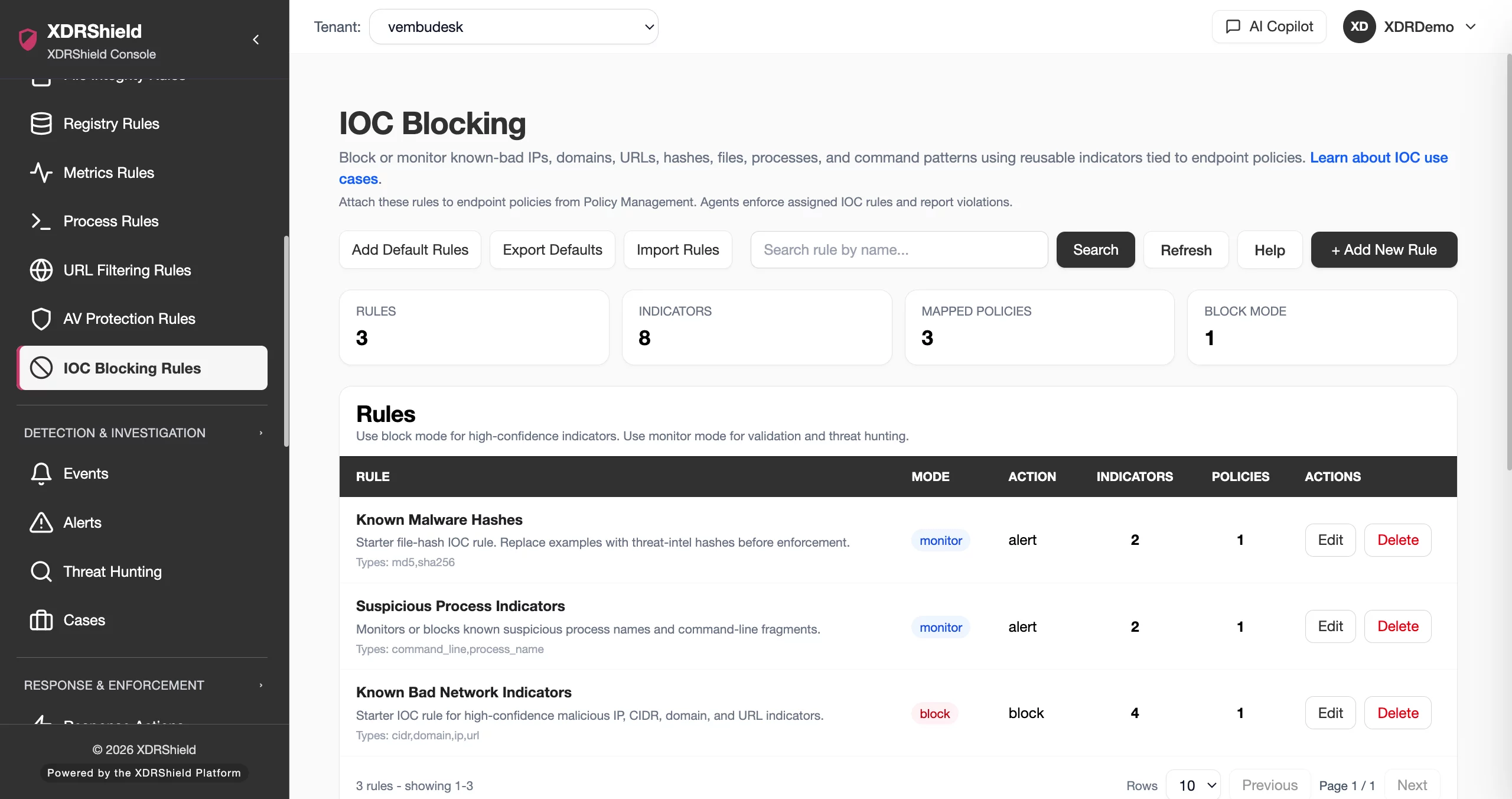
XDRShield IOC Blocking Rules help teams convert trusted threat intelligence into reusable indicator rules, distribute them through endpoint policies, and review match outcomes with alert, event, case, and response context.
Known indicators should become controlled endpoint action.
When teams trust an IP, domain, URL, hash, process, file, or command-line indicator, they need a governed way to monitor or enforce that knowledge across endpoints without losing evidence or tenant scope.
Create indicator rules, attach policies, and verify match outcomes.
IOC Blocking Rules define supported indicator values and enforcement behavior. Rules are distributed through policies to compatible agents, where matches can be reported, blocked, killed, or quarantined depending on rule mode and capability support.
- Define supported indicators such as IPs, domains, URLs, hashes, process names, file paths, and command-line patterns.
- Use monitor mode for validation before enabling disruptive enforcement.
- Attach IOC rules through policies for tenant-scoped endpoint rollout.
- Review matched, blocked, killed, quarantined, or failed outcomes with investigation context.
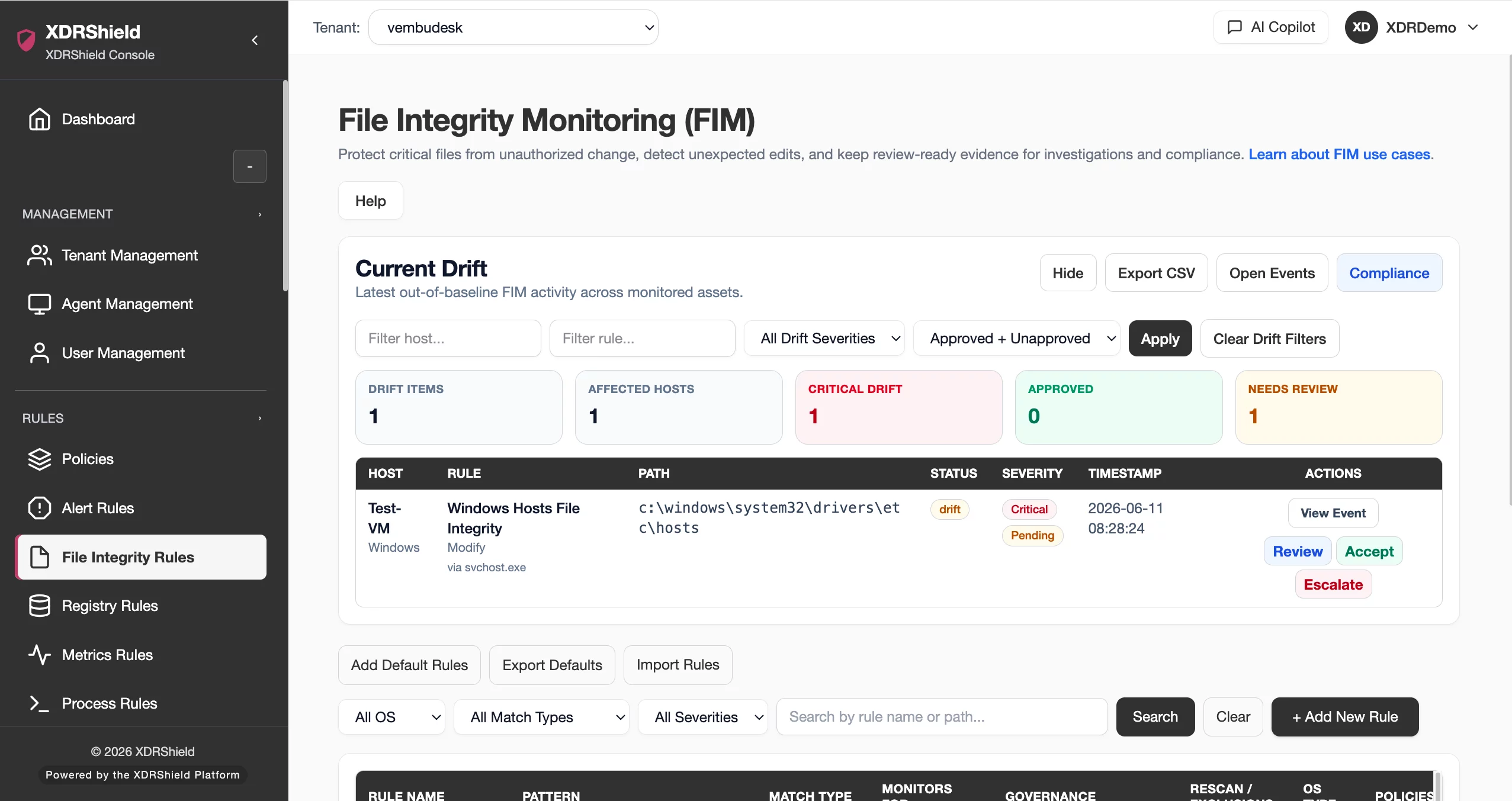
What XDRShield IOC Blocking Rules helps teams do.
Each capability supports the operating workflow for ioc blocking rules, from configuration and validation to investigation, governance, and follow-up.
Indicator definition
Create reusable indicators for IP, domain, URL, file hash, process, file, or command-line patterns.
Monitor and block modes
Choose monitor, alert-only, block, kill, or quarantine based on confidence and risk.
Policy assignment
Distribute IOC rules through compatible endpoint policies.
Match alerting
Surface IOC matches for alert triage and investigation.
Outcome review
Review matched, blocked, killed, quarantined, and failed outcomes with endpoint context.
Hunt validation
Use IOC matches and retained evidence to scope affected endpoints.
Evidence traceability
Preserve indicator source, reviewer decision, and action outcome for audit.
Tenant-scoped threat intel
Apply IOC rules per customer without mixing indicator scope or events.
From indicator validation to endpoint enforcement.
A repeatable ioc blocking rules workflow keeps configuration deliberate, validated, and traceable.
Validate source
Confirm indicator confidence from trusted intelligence or investigation.
Create rule
Add precise indicator type, value, description, and intended behavior.
Start in monitor mode
Validate match volume and false positives before blocking.
Attach through policy
Assign to compatible agents within the right tenant scope.
Review outcomes
Inspect matches, blocked activity, failed actions, and related alerts.
Escalate or enforce
Enable stronger action for high-confidence indicators and send evidence to cases or response.
Where IOC Blocking Rules helps most.
Use ioc blocking rules where endpoint security outcomes depend on consistent configuration and evidence-backed review.
Known malware detection
Detect known file hashes or process indicators.
Malicious infrastructure blocking
Block confirmed IPs, domains, or URLs where supported.
Emergency threat intel rollout
Deploy high-confidence indicators quickly during active incidents.
Hunt validation
Use monitor mode to check whether an indicator appears before enforcement.
Audit-ready decisions
Record indicator source, reviewer decisions, and outcomes.
MSP threat-intel governance
Apply standard or customer-specific indicators without mixing tenants.
Match enforcement strength to indicator confidence.
This table helps teams choose an IOC action mode.
| Area | What it means | How teams use it |
|---|---|---|
| Monitor | Report matches without blocking. | Use for validation, hunting, and false-positive review. |
| Alert-only | Create alert visibility for selected matches. | Use when analyst triage is needed before action. |
| Block | Prevent supported network, domain, URL, or execution behavior. | Use for high-confidence indicators. |
| Kill or quarantine | Terminate process or contain file where supported. | Use only for confirmed high-risk indicators with tested scope. |
IOC Blocking Rules for security, IT, and MSP teams.
IOC Blocking Rules supports day-to-day operations while keeping tenant scope, evidence, and accountable change control clear.
For security and IT teams
Use this feature to keep endpoint protection, detection evidence, and operational decisions aligned with the current environment.
- Validate configuration before broad rollout.
- Review evidence before changing rules or policies.
- Use related alerts, events, cases, and activity logs for context.
For MSP and service-provider teams
Use tenant-scoped operation so customer environments stay separated while common workflows remain repeatable.
- Confirm customer or tenant scope before bulk changes.
- Standardize configuration patterns across customers.
- Preserve customer-specific audit and review evidence.
IOC Blocking Rules FAQs.
What are IOC Blocking Rules in XDRShield?
IOC Blocking Rules define indicators of compromise and supported actions such as monitoring, alerting, blocking, process kill, or file quarantine.
What indicator types can be used?
Supported indicators can include IPs, CIDR ranges, domains, URLs, file hashes, process names, file paths, and command-line patterns, depending on capability support.
Why start in monitor mode?
Monitor mode helps validate match volume and false positives before enabling disruptive block, kill, or quarantine actions.
How are IOC rules deployed?
IOC rules are attached to policies and distributed to compatible agents within selected tenant scope.
How are matches investigated?
Matches can be reviewed with alerts, security events, hunts, cases, response actions, endpoint context, and audit history.
Turn threat intelligence into controlled action
Use IOC rules to monitor, block, and investigate known indicators.












