
Track critical file changes with reusable rules, review workflow, and policy-driven coverage.
XDRShield File Integrity Monitoring Rules help teams define watched paths, change conditions, exclusions, and review expectations so critical file and directory changes become investigation-ready evidence.
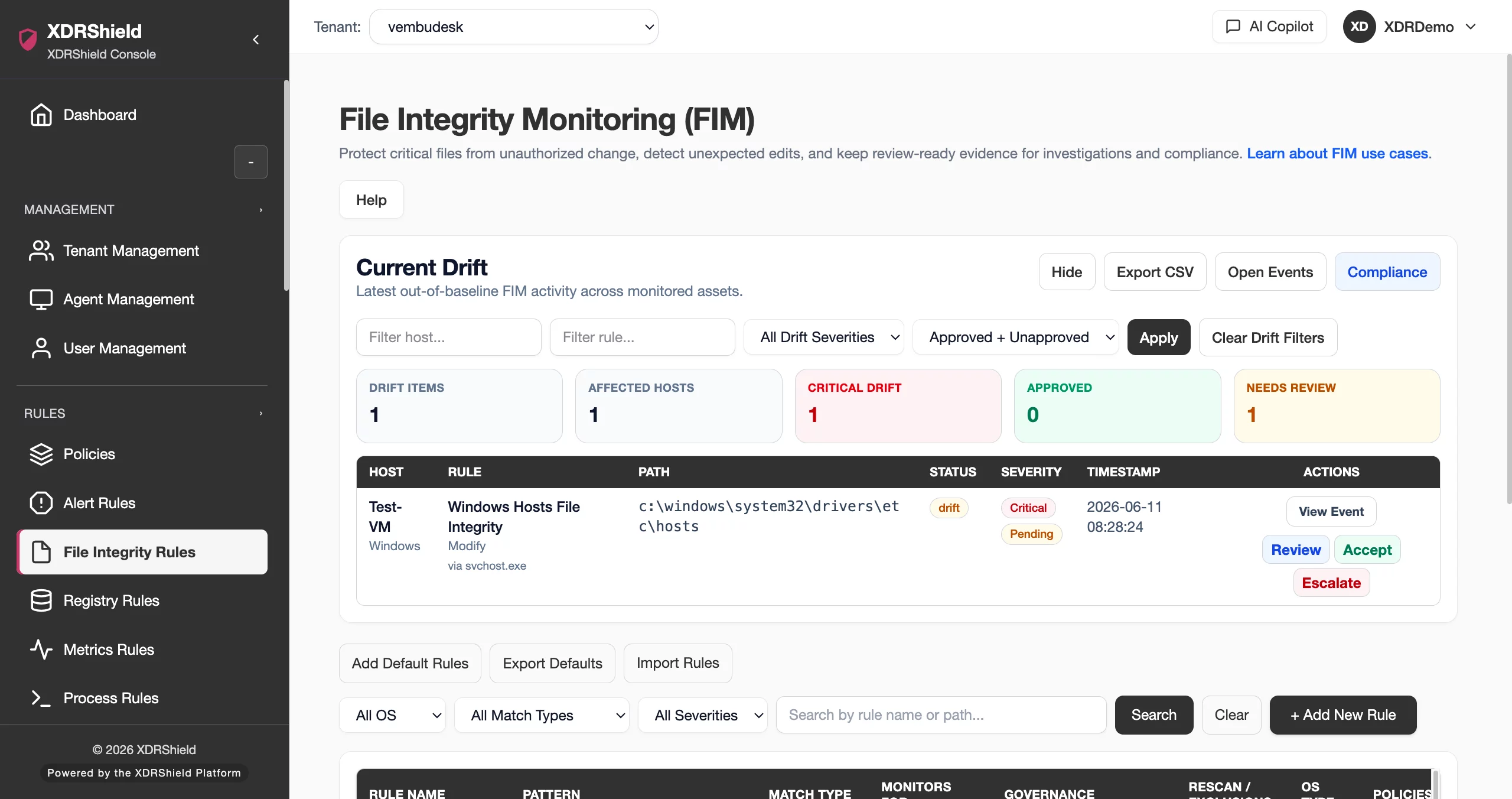
Critical file changes need context, not just volume.
Unplanned changes to sensitive files, directories, scripts, and configurations can indicate compromise, drift, or operational risk. FIM rules help teams monitor the right paths, reduce noise, and preserve reviewable evidence.
Define watched paths, exclusions, and review expectations before assigning rules.
FIM Rules define which files or directories should be monitored and how changes should be surfaced. Rules are distributed through policies to compatible agents, and resulting change events can be reviewed, correlated, and documented.
- Define specific file and directory paths that matter for security, compliance, or operational integrity.
- Use exclusions and scope control to reduce expected or high-volume change noise.
- Attach FIM rules through policies for compatible endpoints.
- Review change events with endpoint, timestamp, process, user, alert, and case context where available.
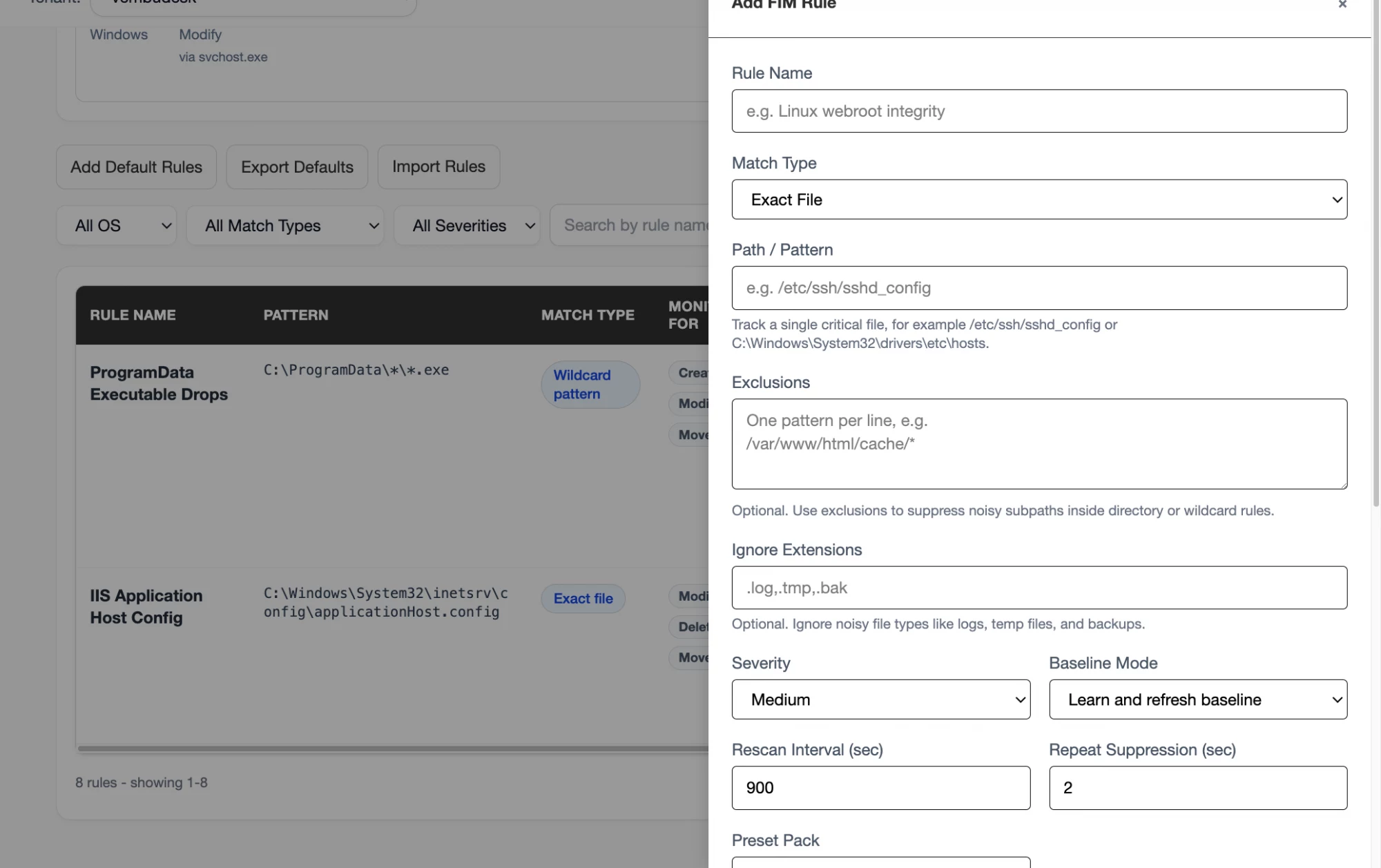
What XDRShield File Integrity Monitoring Rules helps teams do.
Each capability supports the operating workflow for file integrity monitoring rules, from configuration and validation to investigation, governance, and follow-up.
Watched path rules
Define critical files and directories that should produce change evidence.
Change event monitoring
Track creation, modification, deletion, or other supported file-change events.
Exclusion control
Reduce noise by excluding expected temporary, cache, or high-volume paths.
Policy assignment
Distribute FIM rules through compatible endpoint policies.
Review workflow
Review and disposition file-change evidence with operational context.
Investigation correlation
Connect file changes to process activity, alerts, hunts, and cases.
Timeline reconstruction
Use file-change timestamps to understand event sequence during investigation.
Tenant-scoped FIM governance
Apply customer-specific FIM rules without mixing tenant evidence.
From critical path selection to reviewed file-change evidence.
A repeatable file integrity monitoring rules workflow keeps configuration deliberate, validated, and traceable.
Identify critical paths
Choose files and directories that matter for security, application integrity, or compliance.
Create focused rule
Define path, event types, and exclusions clearly.
Assign through policy
Map the rule to compatible agents in the intended tenant scope.
Validate events
Confirm expected changes are reported after rollout.
Review and correlate
Check file-change details against process, alert, and case context.
Tune coverage
Adjust paths and exclusions based on noise and investigation value.
Where FIM Rules helps most.
Use file integrity monitoring rules where endpoint security outcomes depend on consistent configuration and evidence-backed review.
Configuration integrity
Monitor critical application and system configuration files.
Ransomware early signal
Detect unusual file modification patterns when correlated with process and alert context.
Compliance review
Preserve change evidence and review context for audit support.
Incident investigation
Correlate file changes with process activity, registry edits, and endpoint events.
Noise reduction
Tune exclusions for expected high-volume changes.
MSP policy standardization
Deploy customer-specific FIM rule patterns with tenant separation.
Focus file monitoring on high-value changes.
This table helps teams design useful FIM rules.
| Area | What it means | How teams use it |
|---|---|---|
| Watched path | The file or directory being monitored. | Choose critical locations, not broad noisy trees unless justified. |
| Change type | The supported change condition that should be recorded. | Use to align monitoring with risk and review requirements. |
| Exclusion | Expected paths or patterns that should not create noise. | Use carefully so important changes are not hidden. |
| Review context | Endpoint, time, user/process, alert, and case linkage where available. | Use to decide whether the change is expected or suspicious. |
File Integrity Monitoring Rules for security, IT, and MSP teams.
File Integrity Monitoring Rules supports day-to-day operations while keeping tenant scope, evidence, and accountable change control clear.
For security and IT teams
Use this feature to keep endpoint protection, detection evidence, and operational decisions aligned with the current environment.
- Validate configuration before broad rollout.
- Review evidence before changing rules or policies.
- Use related alerts, events, cases, and activity logs for context.
For MSP and service-provider teams
Use tenant-scoped operation so customer environments stay separated while common workflows remain repeatable.
- Confirm customer or tenant scope before bulk changes.
- Standardize configuration patterns across customers.
- Preserve customer-specific audit and review evidence.
File Integrity Monitoring Rules FAQs.
What are File Integrity Monitoring Rules in XDRShield?
FIM Rules define files and directories to monitor for supported change events, then distribute that monitoring through endpoint policies.
What should teams monitor with FIM rules?
Teams should focus on critical system, application, script, security, and configuration paths where unexpected changes create risk.
How can FIM noise be reduced?
Use focused watched paths, meaningful event types, exclusions for expected high-volume changes, and tenant or endpoint scope control.
How do FIM events support investigations?
File-change evidence can be correlated with process activity, registry changes, alerts, hunts, cases, and response records.
How are FIM rules deployed?
FIM rules are attached to policies and synchronized to compatible agents in selected tenant scope.
Monitor critical file changes with context
Use FIM rules to create reviewable change evidence.












