
Proactively hunt threats with query-driven investigation, case timelines, and evidence correlation.
XDRShield Threat Hunting lets security teams query across endpoint and network telemetry — filtering by event type, severity, host, and time range — to uncover threats that automated detection may miss. Findings become tracked cases with evidence-rich timelines that correlate alerts, processes, network events, and file changes into a single investigative view.
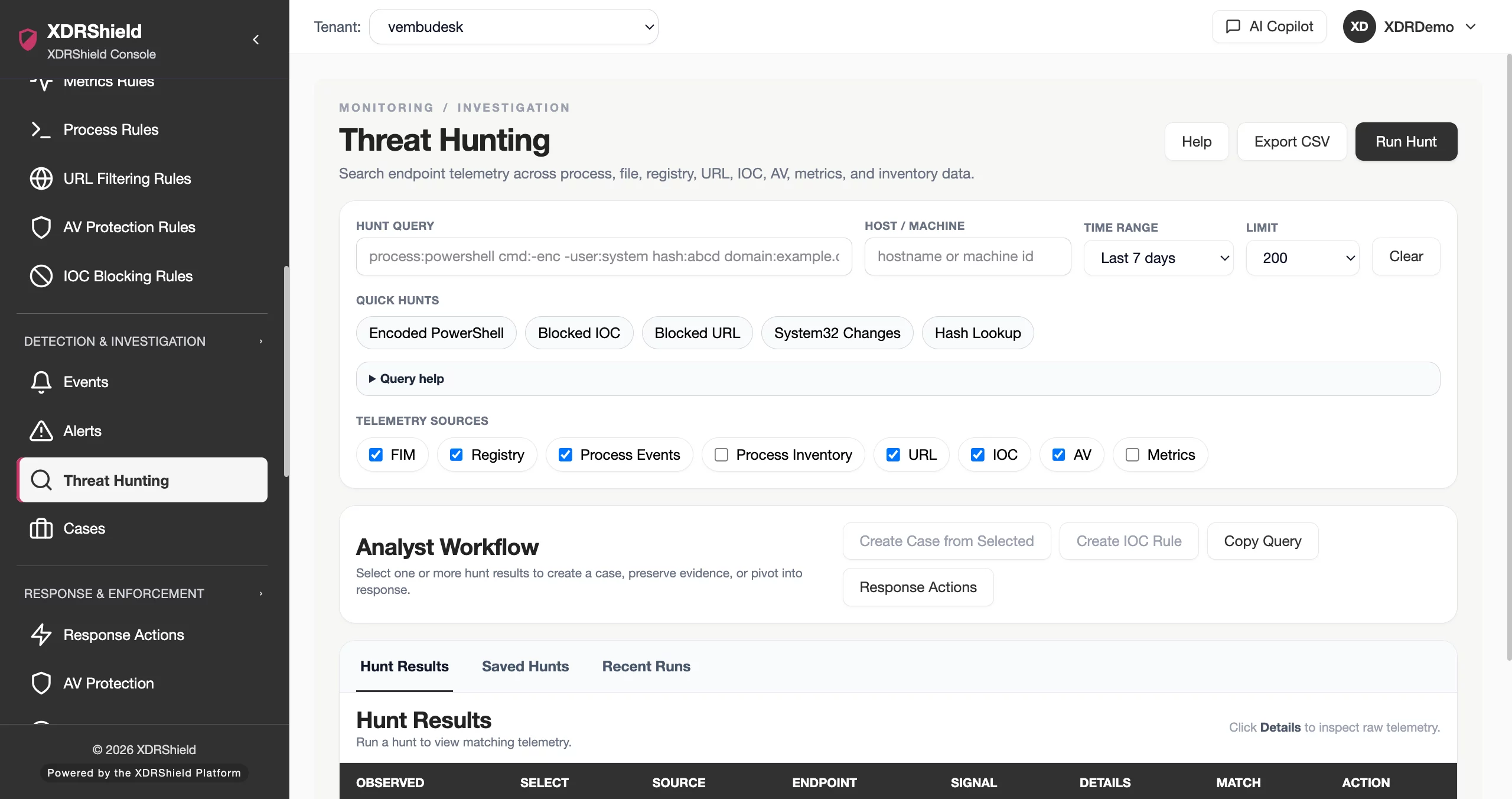
Threat hunting closes the gap between automated detection and human-led investigation.
Automated detection catches known patterns. Threat hunting lets analysts go further — querying historical telemetry, testing hypotheses, and building cases that reconstruct the full scope of an incident with evidence-linked timelines.
Query telemetry, analyze results, and turn findings into tracked cases with timelines.
Threat hunting reads existing endpoint and network telemetry without triggering endpoint actions. Analysts choose a time range, select telemetry sources, and run keyword or field-based queries. Results are scored by matched query fields and free-text terms. High-value findings become cases with chronological timelines that correlate alerts, processes, network events, file changes, and registry modifications into a single investigative view.
- Query across FIM, registry, process, URL filtering, IOC, AV, and metrics telemetry sources.
- Use field:value filters — host, severity, process, user, domain, file, hash, and more — or plain keyword search.
- Save useful queries as repeatable hunts for recurring investigations.
- Export results as CSV for case notes, audit review, or offline analysis.
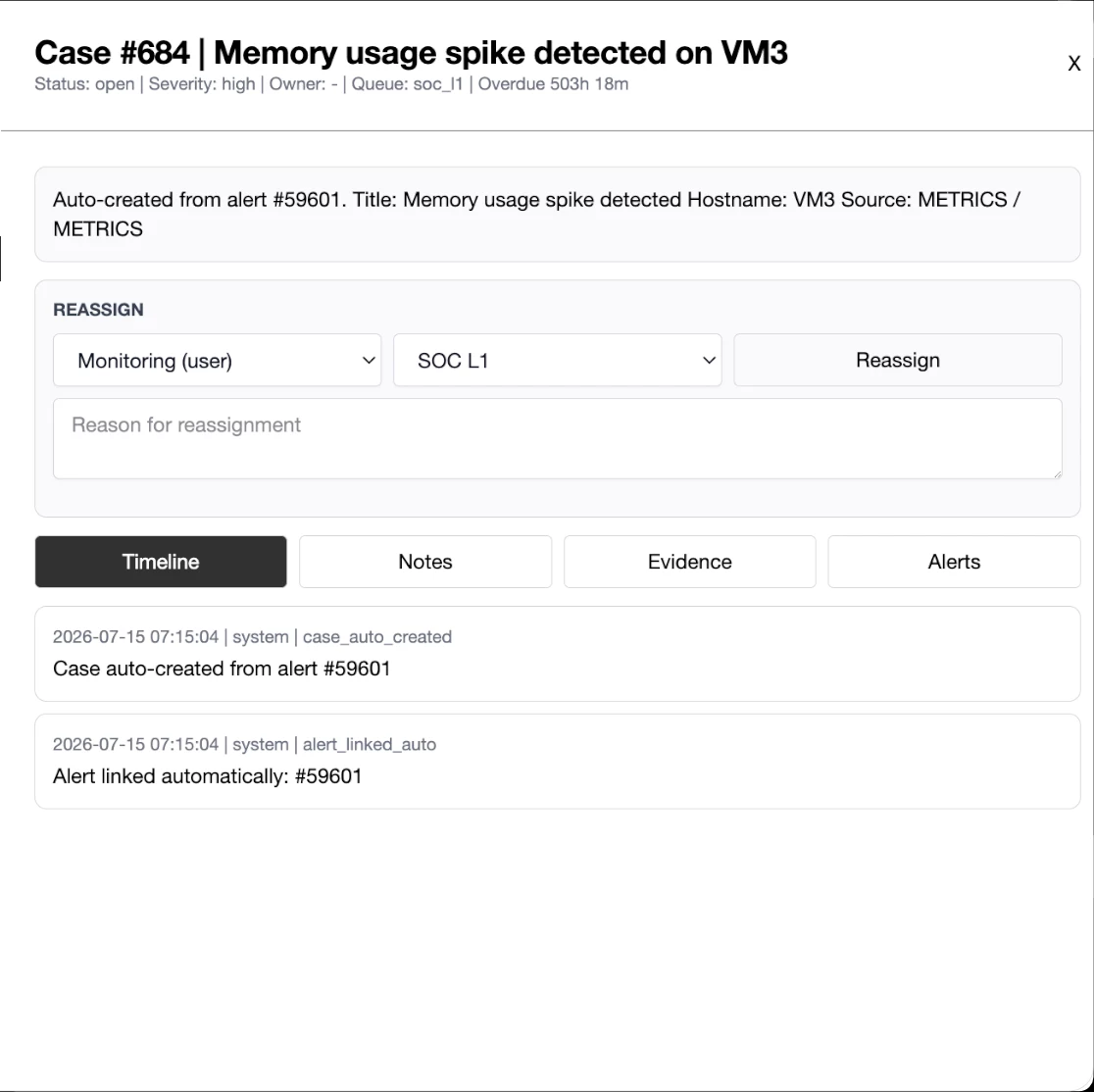
What XDRShield Threat Hunting, Cases, and Timelines helps teams do.
Each capability supports a part of the hunting workflow, from query-based search and case creation to timeline reconstruction, evidence correlation, and response handoff.
Query-based hunting
Filter by event type, severity, host, process, user, domain, file, hash, and time range. Use plain keywords or field:value syntax to narrow results across selected telemetry sources.
Case creation from findings
Turn hunting results into tracked cases with owner assignment, severity, status, and SLA tracking so investigations do not stall and evidence is preserved.
Timeline reconstruction
Build event chronology per case — alerts, process activity, network events, file integrity changes, and registry modifications ordered by time so investigators see the full incident scope.
Evidence correlation
Link alerts, processes, network events, file changes, IOC matches, and registry modifications into a single view so related evidence is never reviewed in isolation.
Search across historical data
Query archived telemetry within selected time ranges to investigate past incidents, validate indicators, or audit compliance trails.
Case assignment and tracking
Assign cases by owner, queue, and severity. Track status through investigation lifecycle with SLA visibility for overdue and due-soon cases.
SOC team collaboration
Share cases, timelines, and evidence links across analysts so findings, context, and investigation progress are visible to the whole team.
Case-to-response handoff
Hand off cases with evidence links, timeline context, and affected endpoints to governed response workflows so response teams act with full investigation backing.
From hunt hypothesis to response handoff.
A strong hunting workflow keeps hypothesis definition, query execution, analysis, case creation, timeline building, and response handoff connected so threats are investigated thoroughly and acted on with evidence.
Define hunt hypothesis
Start with a threat assumption — suspicious process behavior, unusual network activity, or indicator patterns — and decide which telemetry sources and time range to search.
Query and filter events
Run keyword or field-based queries across selected telemetry sources. Narrow with host, severity, process, user, domain, or time filters to reduce noise.
Analyze results
Review result details, inspect raw telemetry, check matched fields, and identify findings worth investigating. Save useful queries for repeatable hunts.
Create case
Turn confirmed findings into a tracked case with owner, severity, status, and SLA so the investigation has accountability and progress visibility.
Build timeline
Correlate alerts, processes, network events, file changes, and registry modifications into a chronological timeline that reconstructs the incident scope.
Hand off to response
Escalate the case with evidence links, timeline context, and affected endpoints to governed response actions so containment proceeds with investigation backing.
Where Threat Hunting, Cases, and Timelines helps most.
Use hunting queries and case timelines where human-led investigation must go beyond automated detection.
Proactive threat discovery
Hunt for suspicious activity patterns — encoded PowerShell, SYSTEM-level shells, unusual domain contacts — that automated rules may not flag.
Post-incident investigation
After an alert or incident, query historical telemetry to trace the full scope, identify affected endpoints, and reconstruct the attack timeline.
Compliance audit trails
Export hunting results and case timelines as evidence for compliance reviews, audit requests, and post-incident reporting.
Suspicious activity review
Investigate anomalous process activity, registry changes, or network connections reported by users, SIEM alerts, or threat intelligence feeds.
Historical threat analysis
Search archived telemetry to determine whether a newly discovered indicator or technique has been present in the environment before.
MSP customer-specific hunting
Run hunting queries scoped to individual customers or across the managed estate. Cases, timelines, and findings stay separated by tenant.
Threat hunting for SOC and MSP teams.
The same hunting, case, and timeline capabilities support different operational decisions. XDRShield keeps query context, evidence links, and case ownership usable without losing tenant scope or investigation continuity.
For SOC and investigation teams
Use hunting queries to proactively discover threats, build case timelines that correlate alerts and process activity, and escalate findings into governed response.
- Query across FIM, registry, process, URL, IOC, and AV telemetry sources.
- Build evidence-rich case timelines for incident reconstruction.
- Hand off cases with full evidence context to response workflows.
For MSP and multi-tenant operations
Run customer-specific hunting queries across the managed estate while keeping tenant-specific cases, timelines, and audit trails separated by customer.
- Scope hunting queries to individual customers or across tenants.
- Keep tenant-specific cases, timelines, and findings separated.
- Export results per customer for audit and compliance reporting.
Threat Hunting, Cases, and Timelines FAQs.
What is Threat Hunting in XDRShield?
Threat hunting in XDRShield lets security teams proactively query endpoint and network event data to uncover threats that automated detection may miss. Teams can filter by event type, severity, host, and time range, then turn findings into tracked cases with evidence-rich timelines.
How do case timelines work?
Each case builds a chronological timeline that correlates alerts, process activity, network events, file integrity changes, and registry modifications into a single view. Investigators can trace the full scope of an incident without pivoting between disconnected tools.
Can hunting findings be connected to response actions?
Yes. Cases created from hunting queries can be handed off to governed response workflows. Evidence links, timeline context, and affected endpoints carry forward so response teams can act with full investigation context.
What data sources can threat hunters query?
Hunters can query across security events, endpoint detection alerts, process monitoring data, file integrity changes, registry modifications, network device events, and vulnerability findings. Cross-signal correlation connects related evidence automatically.
How does threat hunting support MSP operations?
MSP analysts can run hunting queries scoped to individual customers or across the managed estate. Cases, timelines, and findings stay separated by tenant, so each customer investigation remains self-contained and auditable.
Hunt threats, build case timelines, and hand findings to response with evidence.
Use XDRShield Threat Hunting, Cases, and Timelines to query telemetry, correlate evidence, build investigative timelines, and hand off cases to governed response with full context.












