
Detect, monitor, and block known threats using indicators of compromise.
XDRShield IOC Monitoring and Supported Blocking lets security teams define reusable indicators of compromise — IPs, domains, URLs, file hashes, and process patterns — attach them to endpoint policies for agent-enforced detection or blocking, and review match outcomes with full endpoint, alert, and investigation context.
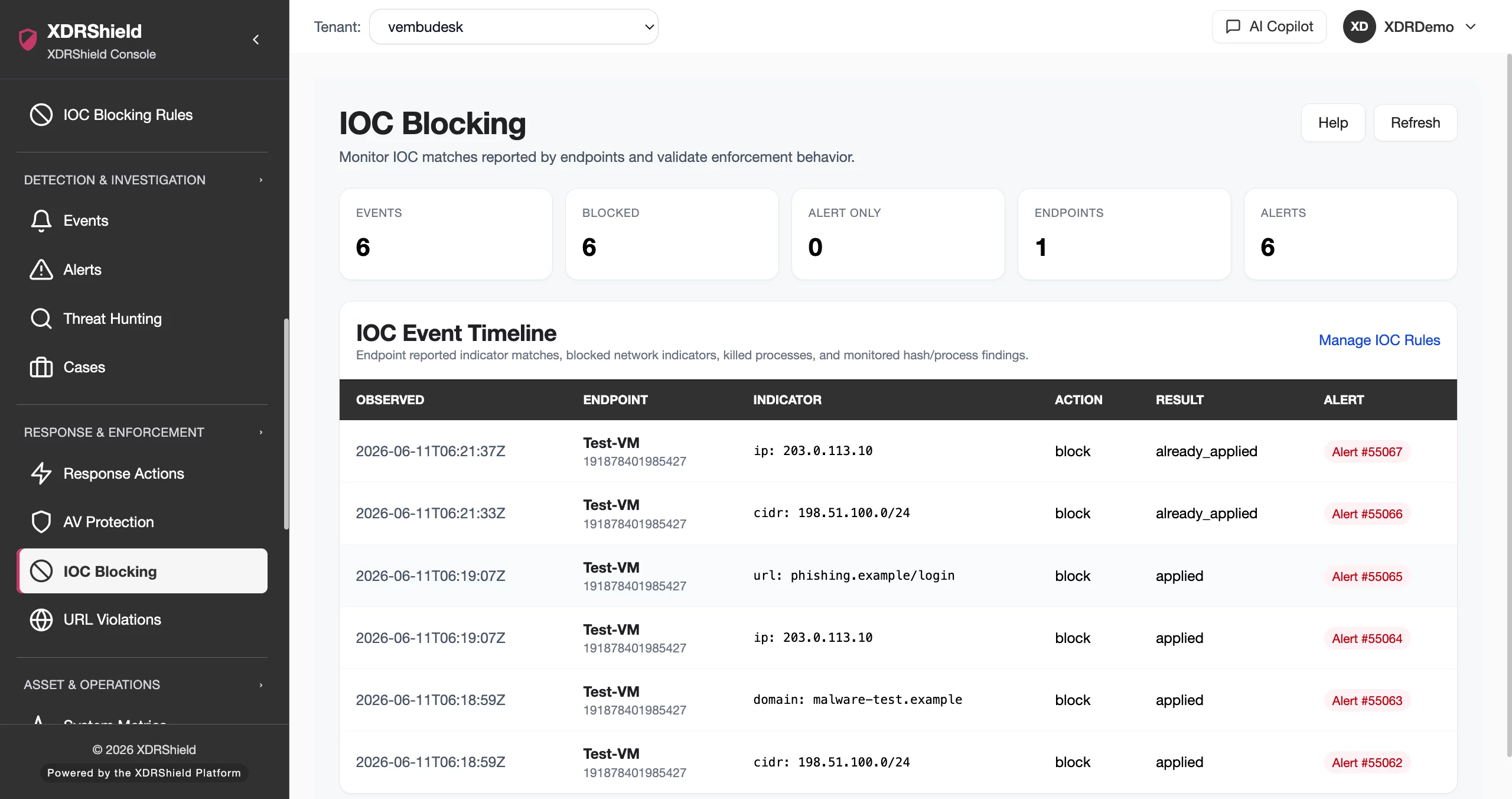
Indicators of compromise are the fastest way to turn threat intelligence into endpoint action.
Known malicious IPs, domains, URLs, file hashes, and process patterns help teams detect and block threats before they escalate. IOC rules make those indicators policy-enforced, reviewable, and connectable to alerts, cases, and investigation workflows.
Define indicators, attach rules to policies, and review match outcomes with full context.
IOC rules are reusable monitoring and enforcement definitions. Each rule specifies the indicator types and values to watch, the enforcement mode, and optional hash-scan scope. Rules attach to endpoint policies for agent enforcement, and detected matches become reviewable events with endpoint, tenant, timestamp, action result, and alert context.
- Create reusable IOC rules with supported indicator types: IP, domain, URL, hash, process, file, and command line.
- Choose monitor, block, alert-only, kill, or quarantine modes based on indicator confidence.
- Attach rules to endpoint policies for agent-enforced monitoring across tenant-scoped endpoints.
- Review match outcomes as events with endpoint, indicator, action result, and alert linkage.
What XDRShield IOC Monitoring and Supported Blocking helps teams do.
Each capability supports a part of the IOC monitoring and blocking workflow, from rule creation and indicator management to enforcement, event review, and investigation linkage.
Indicator type coverage
Monitor and block IPs, CIDR ranges, domains, URLs, SHA-256/SHA-1/MD5 file hashes, process names, file paths, and command-line patterns.
Monitor and block modes
Start in monitor mode to validate matches, then switch to block, kill process, or quarantine file for high-confidence indicators.
Policy-based enforcement
Attach IOC rules to endpoint policies for agent-enforced monitoring and blocking across tenant-scoped endpoints and operating systems.
Match event review
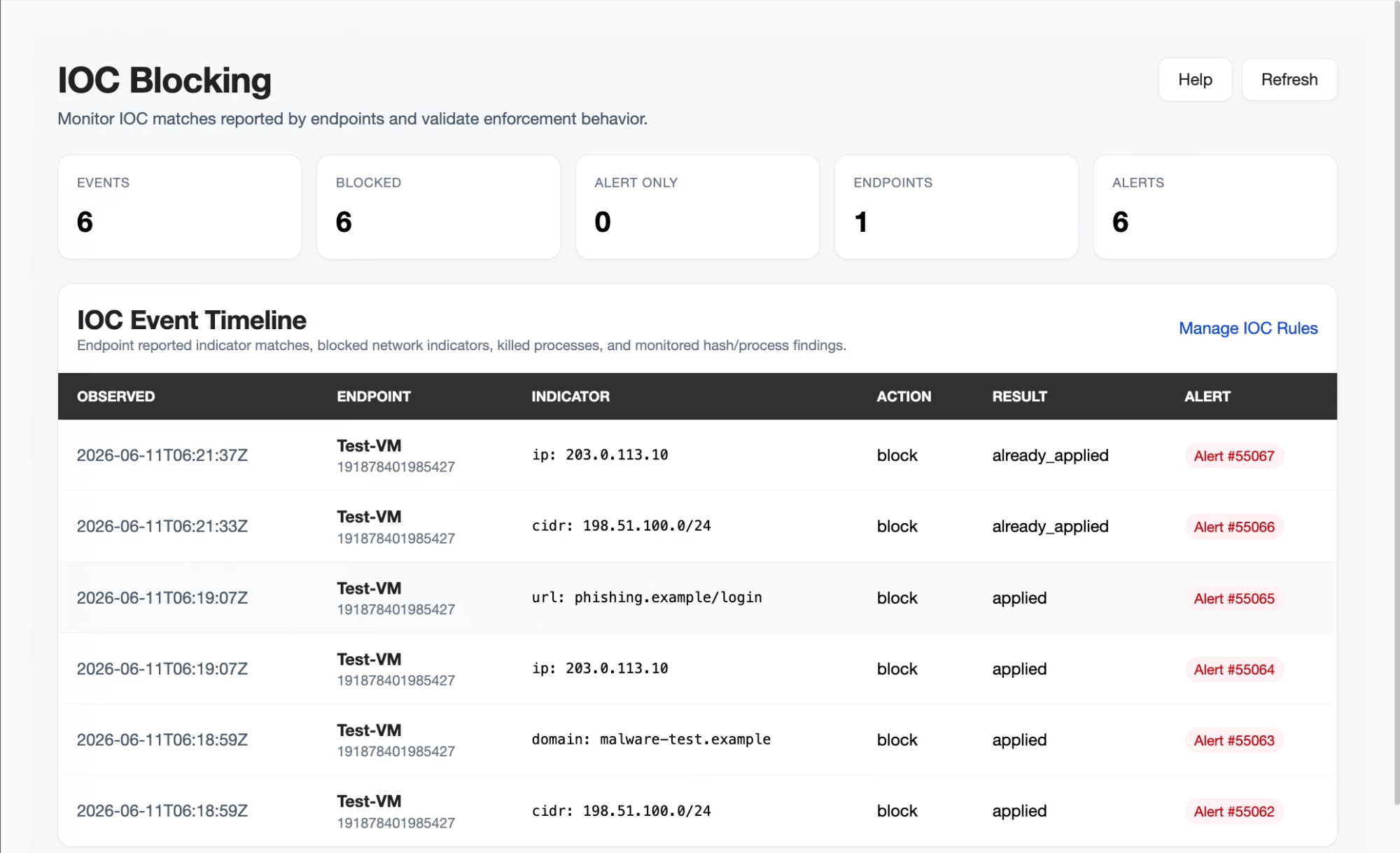
Review IOC match events with observed time, endpoint, matched indicator, configured action, result, and linked alert.
Alert and event correlation
Connect IOC events to security alerts, event triage, and case workflows so indicator matches are not reviewed in isolation.
Investigation and case linkage
Move from an IOC match into threat hunting, case ownership, timelines, and governed response with full evidence context.
Endpoint hash scanning
Configure file-hash scan scope — recommended risk paths, extended user scope, or full disk — with size, depth, and schedule limits.
Tenant-scoped audit and traceability
Preserve indicator source, reviewer decisions, action outcomes, and event history for compliance and audit workflows.
From indicator validation to enforcement and investigation.
A strong IOC workflow keeps indicator validation, rule creation, policy assignment, event review, and investigation connected so threats are detected, blocked, and acted on consistently.
Validate indicator source
Confirm indicator confidence from trusted threat intel, investigation findings, or feed sources before creating a rule.
Create focused rule
Add precise indicators with type, value, and description. Avoid broad patterns that create noisy events.
Start in monitor mode
Begin with monitor or alert-only mode to validate match volume and confirm expected endpoints before enforcing.
Attach through policy
Map IOC rules into endpoint policies for agent-enforced monitoring across tenants and endpoint groups.
Review events
Check IOC events for matches, action results, false positives, and endpoint reporting before enabling stronger enforcement.
Enable blocking
Switch verified rules to block, kill, or quarantine for high-confidence indicators and escalate unapproved matches into investigation.
Where IOC Monitoring and Supported Blocking helps most.
Use IOC rules where known indicators can detect, contain, or prevent threats across endpoints.
Malicious infrastructure blocking
Block known command-and-control IPs, CIDR ranges, phishing domains, and malicious URLs from reaching endpoints.
Known malware detection
Detect files by SHA-256, SHA-1, or MD5 values obtained from trusted threat intelligence feeds or investigation findings.
Emergency containment
Rapidly distribute confirmed indicators across endpoints while incident response and eradication work continues.
Threat-intel operationalization
Convert investigated or feed-sourced indicators into policy-controlled endpoint protection with audit traceability.
Hunt validation
Use monitor mode to determine whether a new indicator exists across endpoints before enabling enforcement.
MSP and multi-tenant governance
Standardize IOC policies across customers while keeping tenant-specific rules, event queues, and audit trails separate.
Match outcomes show whether indicators were detected, blocked, or need follow-up.
Each IOC event reports the action result so teams can confirm whether enforcement succeeded, failed, or requires investigation.
From match to decision
From action to result
IOC blocking for security, infrastructure, and MSP teams.
The same indicator evidence supports different decisions. XDRShield keeps rule context, match events, and audit history usable without losing tenant scope or operational responsibility.
For SOC and investigation teams
Use IOC events to detect known threats, correlate with alerts and process activity, and escalate matches into hunts, cases, and governed response.
- Connect IOC matches to alerts, events, and case timelines.
- Review match outcomes with endpoint, policy, and indicator context.
- Escalate blocked or failed actions into investigation and response.
For MSP and IT operations teams
Standardize IOC policies across managed environments while keeping tenant-specific rules, event queues, and audit trails separated by customer.
- Apply consistent IOC rules across customers and tenants.
- Keep tenant-specific match events and audit history separate.
- Use policy assignment for controlled rollout and coverage.
IOC Monitoring and Supported Blocking FAQs.
What is IOC Monitoring and Supported Blocking in XDRShield?
IOC Monitoring and Supported Blocking lets security teams define reusable indicators of compromise — IPs, domains, URLs, file hashes, and process patterns — attach them to endpoint policies for agent-enforced detection or blocking, and review match outcomes with full endpoint, alert, and investigation context.
What indicator types does XDRShield support?
XDRShield supports IP and CIDR ranges, domains, URLs, SHA-256, SHA-1, and MD5 file hashes, and process, file, and command-line patterns. Each indicator type maps to appropriate agent enforcement capabilities.
How do IOC rules connect to endpoint policies?
IOC rules are reusable monitoring and enforcement definitions. They attach to endpoint policies for agent-enforced monitoring, so each endpoint agent knows which indicators to watch and which actions to apply when matches occur.
What enforcement modes are available?
Monitor mode reports matches without blocking. Block mode enforces network or execution controls. Alert-only mode creates visibility without remediation. Kill process and quarantine file modes are available for high-confidence process or file indicators.
How does IOC blocking support MSP and multi-tenant operations?
MSP teams can standardize IOC policies across customers while keeping tenant-specific rules, match event queues, and audit trails separated by customer, tenant, and workspace scope.
Detect, monitor, and block known threats with policy-enforced IOC rules.
Use XDRShield IOC Monitoring and Supported Blocking to detect known threats, validate indicators, enforce blocking, and connect match evidence to alerts, cases, and governed response.












