
Manage customer scope, tenant lifecycle, and service-provider operations without mixing environments.
XDRShield Customer Management helps MSP and administrative teams organize customer records, tenant relationships, workspace scope, access boundaries, branding alignment, and service operations so security workflows remain customer-separated and governable.
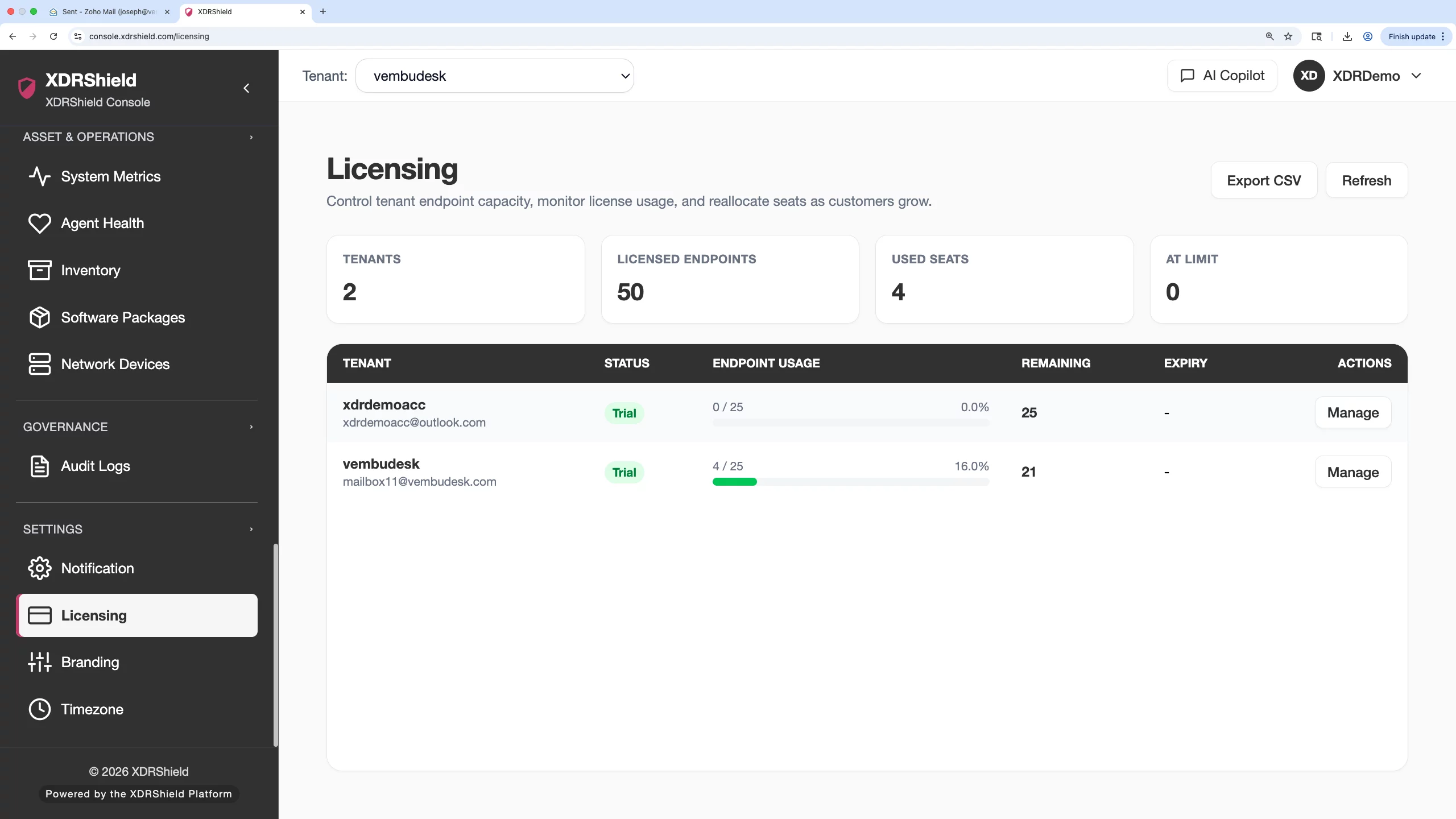
MSP security operations depend on clean customer boundaries.
When multiple customers, tenants, users, agents, policies, alerts, cases, and response workflows live in one platform, customer management becomes a governance control. Clear customer scope reduces assignment mistakes, reporting confusion, and cross-tenant operational risk.
Create and maintain customer scope for secure multi-tenant operations.
Customer Management supports the operational structure around managed customers. Teams can review customer identity, tenant/workspace relationship, service status, branding alignment, user and role coordination, endpoint onboarding readiness, and related operational records before expanding security workflows.
- Maintain customer records and service scope for MSP or multi-tenant operations.
- Coordinate customer setup with users, agents, policies, branding, alerts, cases, and audit history.
- Validate customer scope before bulk assignments, exports, or response workflows.
- Use customer-specific evidence for service reviews, onboarding, and lifecycle decisions.
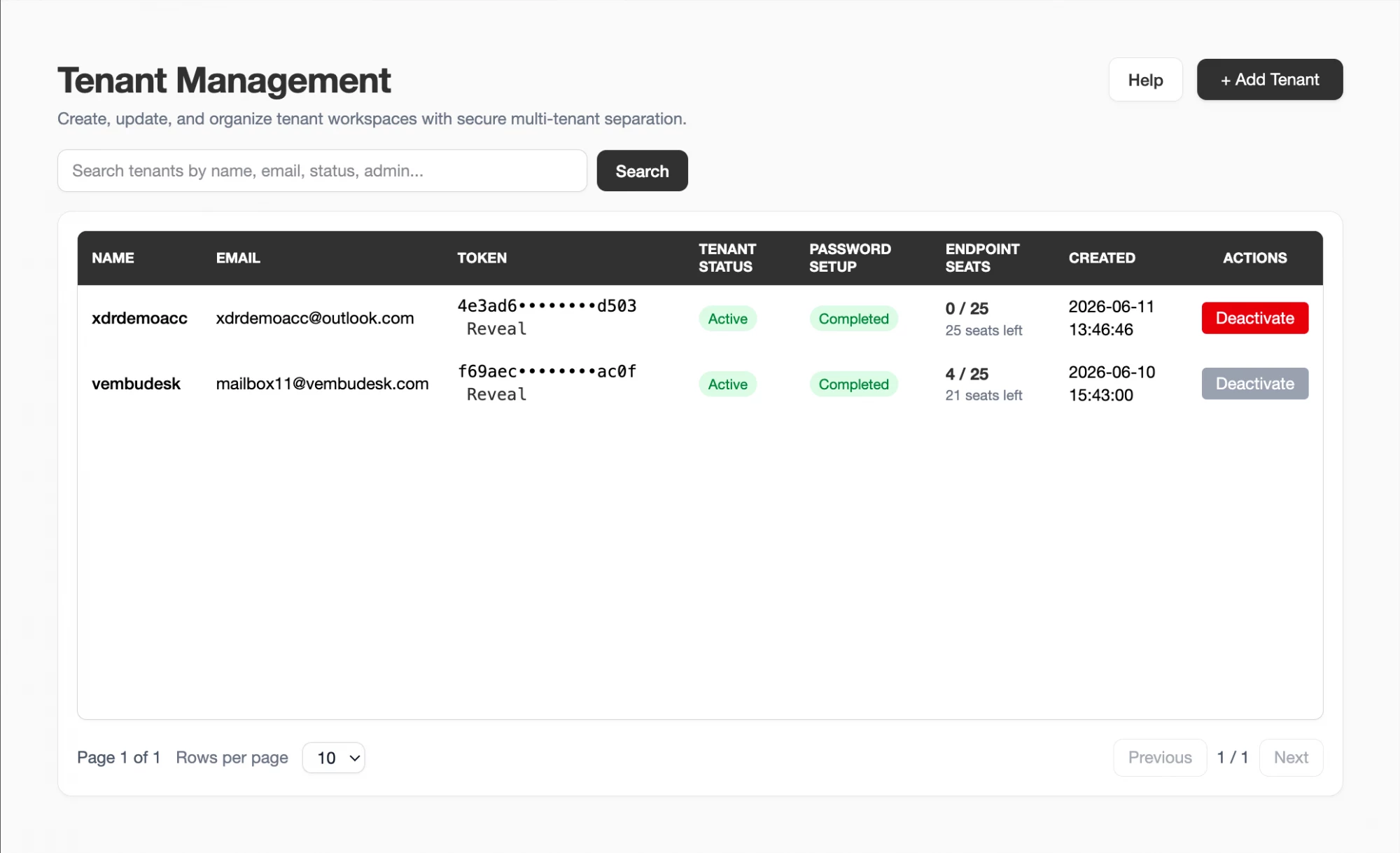
What XDRShield Customer Management helps teams do.
Each capability supports safe multi-customer service delivery and customer-specific security operations.
Customer record management
Maintain the customer identity and service scope needed for tenant-aware security operations.
Tenant and workspace alignment
Keep customer, tenant, and workspace relationships clear before operational work begins.
Service setup coordination
Coordinate users, agents, policies, branding, notifications, and licensing context during onboarding.
Scope validation
Confirm customer context before policy assignment, alert review, case handling, response action, or export.
Customer activity evidence
Use Activity Logs to confirm administrative changes and preserve customer-specific review history.
Operational visibility
Review customer readiness across agents, health, alerts, cases, policies, and dashboard-level signals.
Endpoint onboarding alignment
Connect customer setup with agent deployment, health checks, version review, and policy mapping.
Customer-specific investigation
Filter security workflows by customer or tenant to isolate related alerts, events, cases, and evidence.
From customer setup to governed service operation.
Customer management works best when setup, scope validation, and operational evidence stay connected.
Create or review customer scope
Confirm the customer record, tenant relationship, workspace, service status, and intended operational boundaries.
Align users and access
Validate delegated users, roles, and access expectations before handing over or expanding operations.
Connect agents and policies
Coordinate endpoint onboarding, health checks, policy assignment, and coverage readiness within the customer scope.
Apply branding where needed
Align supported customer-facing presentation with approved branding settings.
Operate security workflows
Review alerts, events, cases, response actions, and activity logs within the right customer scope.
Review lifecycle evidence
Use audit history, exports, and operational summaries for customer reviews, renewals, and service changes.
Where Customer Management helps most.
Use Customer Management when MSP teams need customer separation, onboarding control, and service lifecycle governance.
New customer onboarding
Create or verify customer scope before deploying agents, assigning policies, or granting access.
Service expansion
Add security workflows, users, policies, branding, or licensing context as a customer environment grows.
Cross-tenant risk reduction
Validate customer scope before bulk actions, exports, response workflows, or policy assignments.
Customer review preparation
Collect customer-specific activity, alert, case, and operational evidence for service reviews.
Operational readiness checks
Confirm dashboards, agents, health, alerts, cases, and policies are aligned before customer handoff.
Customer incident response
Scope alerts, events, cases, and response actions to the correct customer during incidents.
Keep customer lifecycle work connected to operational scope.
This table separates customer-management concerns from adjacent security workflows.
| Area | What it means | How teams use it |
|---|---|---|
| Customer identity and scope | The customer record, tenant relationship, workspace, and service boundary. | Use before onboarding, reporting, user setup, policy assignment, or response work. |
| Users and access | Delegated operators, roles, and customer-specific access expectations. | Use to keep customer access aligned with service responsibility. |
| Agents and policies | Endpoint onboarding, health, policy assignment, and coverage readiness. | Use after customer scope is confirmed and before treating monitoring as active. |
| Evidence and governance | Activity logs, alerts, cases, reports, and exports tied to the customer. | Use for service reviews, audits, and customer-specific investigation history. |
Customer management for MSP and security operations.
Customer Management ties operational scope to security workflows so MSP teams can scale without losing boundaries.
For MSP and service-provider teams
Use Customer Management to structure customers, tenants, users, branding, agents, policies, and service evidence.
- Validate scope before operational changes.
- Coordinate onboarding across security workflows.
- Prepare customer-specific review evidence.
For security and governance teams
Use customer scope to keep alerts, cases, response actions, exports, and activity reviews separated by environment.
- Filter investigations by customer and tenant.
- Avoid cross-customer policy or response mistakes.
- Preserve customer-specific audit records.
Customer Management FAQs.
What is Customer Management in XDRShield?
Customer Management helps service-provider and administrative teams organize customer records, tenant relationships, workspace scope, service operations, access boundaries, branding alignment, and customer-specific evidence.
Why is customer scope important?
Clear customer scope helps prevent cross-tenant mistakes when assigning policies, reviewing alerts, exporting records, managing users, or taking response actions.
How does Customer Management support onboarding?
Customer setup can be coordinated with users, roles, agent deployment, health checks, policy assignment, branding, dashboards, and activity evidence before service handoff.
Does Customer Management replace security policies?
No. Customer Management structures customer and tenant scope. Detection rules, policy assignments, alerts, cases, and response workflows remain managed in their dedicated areas.
How does this support MSP operations?
MSP teams can operate multiple customer environments with separated tenant context, delegated access, customer-specific evidence, and consistent service lifecycle workflows.
Manage customer lifecycle without mixing security environments.
Use XDRShield Customer Management to structure customers, validate tenant scope, coordinate onboarding, and preserve customer-specific operational evidence.












