
Define web access rules that help control risky destinations and preserve violation evidence.
XDRShield URL Filtering Rules helps teams configure domain, URL, or category-style web control policies where supported, distribute them through endpoint policies, and review violations with endpoint, tenant, and investigation context.
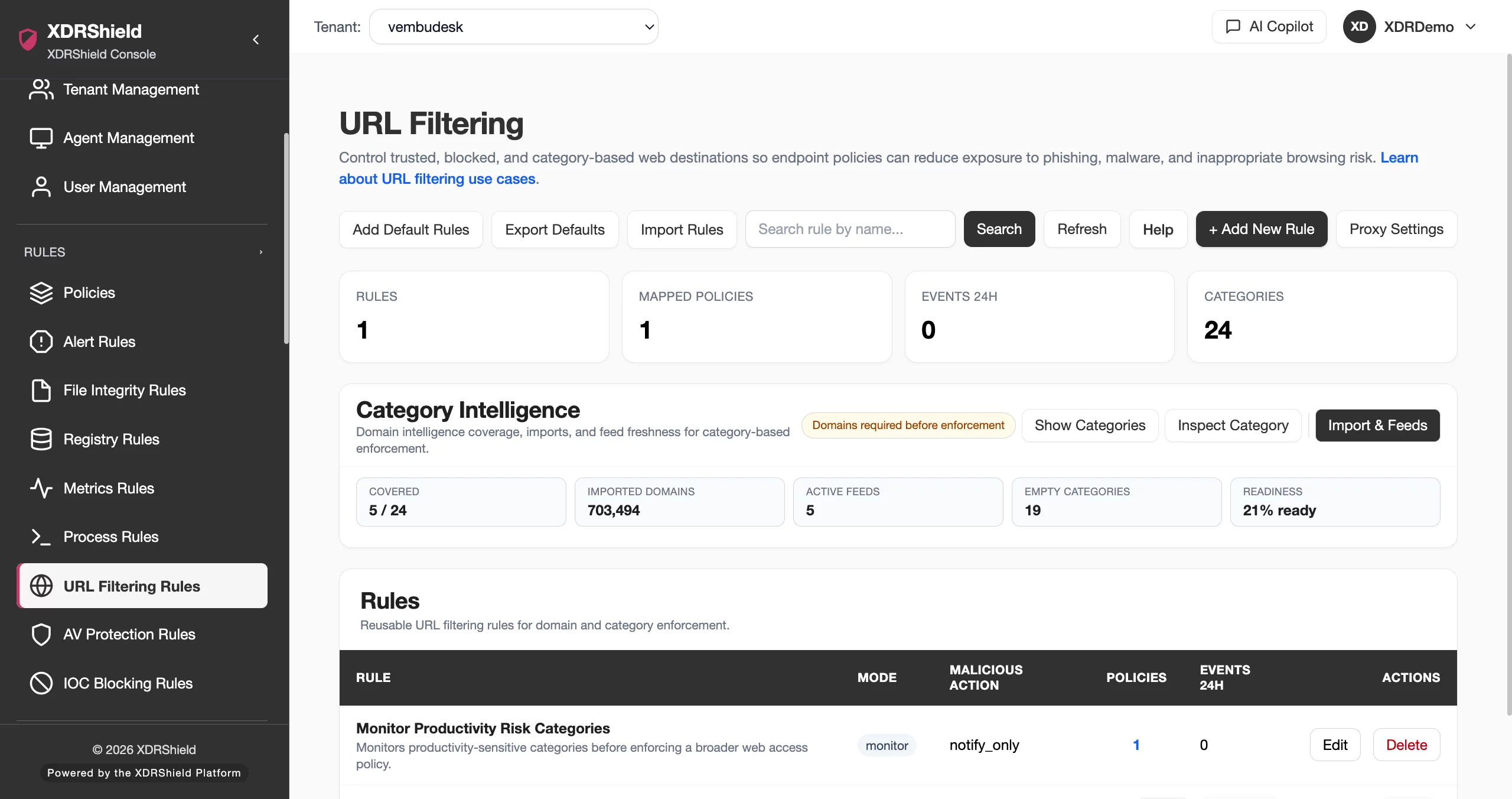
Web access control is most useful when rule intent and violation evidence stay connected.
Security and IT teams need a controlled way to restrict risky destinations, validate enforcement scope, and review violations without losing endpoint or tenant context. URL Filtering Rules turns web-control requirements into reusable policy-driven rules.
Create web access rules, attach them to policies, and review outcomes in violation monitoring.
URL Filtering Rules describe the destinations or web-access conditions that should be monitored or blocked. Rules become operational when attached to endpoint policies and validated through violation evidence, endpoint health, and audit records.
- Define focused URL, domain, pattern, or supported category rules with a clear security or business purpose.
- Attach rules to policies for compatible endpoint scope and tenant boundaries.
- Review URL filtering violations to validate enforcement and tune noisy rules.
- Use audit logs to track who changed web-control rules and when.
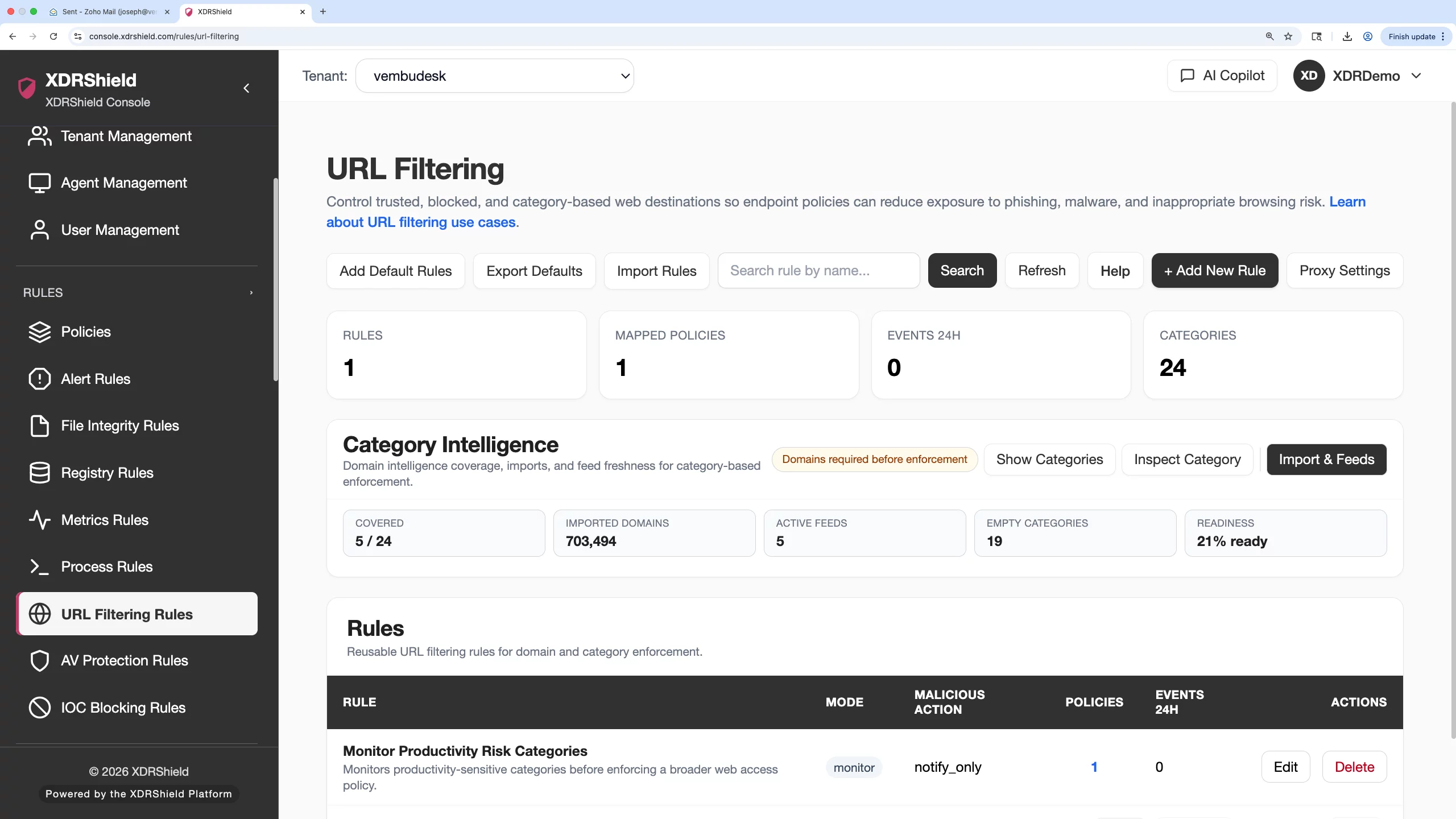
What XDRShield URL Filtering Rules helps teams do.
Each capability supports the operating workflow for url filtering rules, from configuration and validation to governance, response, and follow-up.
Web access control rules
Define destinations or patterns that should be monitored or restricted.
Domain and URL context
Use clear rule values so analysts understand why a destination matched.
Policy assignment
Distribute URL rules through endpoint policies for governed rollout.
Violation monitoring
Review blocked or violated access attempts with endpoint context.
Tuning and exceptions
Use violation volume and context to refine broad or noisy rules.
Change timing
Use audit logs to understand when rule changes affected enforcement.
Rule documentation
Document rule intent, reviewer notes, and expected outcome for future tuning.
Tenant-scoped web control
Apply customer-specific URL policies without mixing tenant scope.
From web-control requirement to verified rule outcome.
A repeatable workflow keeps URL filtering controlled and reviewable.
Define rule objective
Decide whether the rule is for risk reduction, policy compliance, or monitoring.
Create precise rule
Use the narrowest supported URL, domain, pattern, or category scope.
Attach through policy
Assign the rule through the correct endpoint policy and tenant scope.
Validate enforcement
Review violation monitoring and endpoint health after rollout.
Tune exceptions
Adjust rules when violations show expected business activity or excessive noise.
Review change evidence
Use activity logs and violation history for audit or customer review.
Where URL Filtering Rules helps most.
Use URL Filtering Rules when web access policy needs endpoint enforcement and reviewable evidence.
Risky destination control
Restrict known malicious, risky, or non-business destinations where supported.
Violation triage
Review attempted access to restricted URLs with endpoint context.
Policy standardization
Deploy consistent web-control rules across endpoint groups.
Exception review
Tune rules based on legitimate business access and violation volume.
Audit evidence
Preserve rule intent, policy scope, and change history.
MSP customer policies
Apply customer-specific web-control requirements with tenant separation.
Match rule strength to business and security intent.
This table helps teams choose a practical web-control approach.
| Area | What it means | How teams use it |
|---|---|---|
| Monitor | Record web access or violation evidence without blocking where supported. | Use for validation and exception discovery. |
| Block | Restrict selected destinations or patterns. | Use for high-confidence risk or policy requirements. |
| Exception | Allow necessary business access that would otherwise match a rule. | Use narrowly and document the reason. |
| Policy scope | The endpoint or tenant group receiving the rule. | Validate before rollout to prevent over-blocking. |
URL Filtering Rules for security, IT, and MSP teams.
URL Filtering Rules supports day-to-day operations while keeping tenant scope, evidence, and accountable change control clear.
For security and IT teams
Use this feature to keep administrative control, endpoint policy behavior, and operational evidence aligned with the intended environment.
- Validate tenant and user scope before changes.
- Review related logs, alerts, and settings before broad action.
- Use cases, audits, and operations health for follow-up evidence.
For MSP and service-provider teams
Use tenant-aware administration so customer environments stay separated while configuration patterns remain repeatable.
- Confirm customer or tenant scope before bulk changes.
- Standardize controls without mixing customer data.
- Preserve evidence for customer-facing service reviews.
URL Filtering Rules FAQs.
What are URL Filtering Rules in XDRShield?
URL Filtering Rules define supported web-access conditions such as URLs, domains, patterns, or categories that should be monitored or restricted through endpoint policies.
How are URL rules deployed?
They are attached to policies and synchronized to compatible endpoint agents in the selected tenant scope.
How should teams avoid over-blocking?
Start with clear rule purpose, narrow scope, validation through violation monitoring, and documented exceptions where business access is required.
Where are violations reviewed?
URL filtering outcomes can be reviewed through URL filtering violation monitoring, alerts, events, cases, and audit logs where available.
How does this support MSPs?
MSPs can apply customer-specific URL filtering policies while preserving tenant-separated evidence and change history.
Use URL filtering rules to reduce risk and preserve violation context.
Use XDRShield URL Filtering Rules to define, distribute, validate, and tune web access controls across endpoint and tenant scope.












