
Deploy, review, and maintain endpoint agents with policy-aware operational control.
XDRShield Agent Management gives operators a single place to manage enrolled endpoints across tenants, review installation and version status, confirm online and sync state, and map policies safely during onboarding and ongoing maintenance.
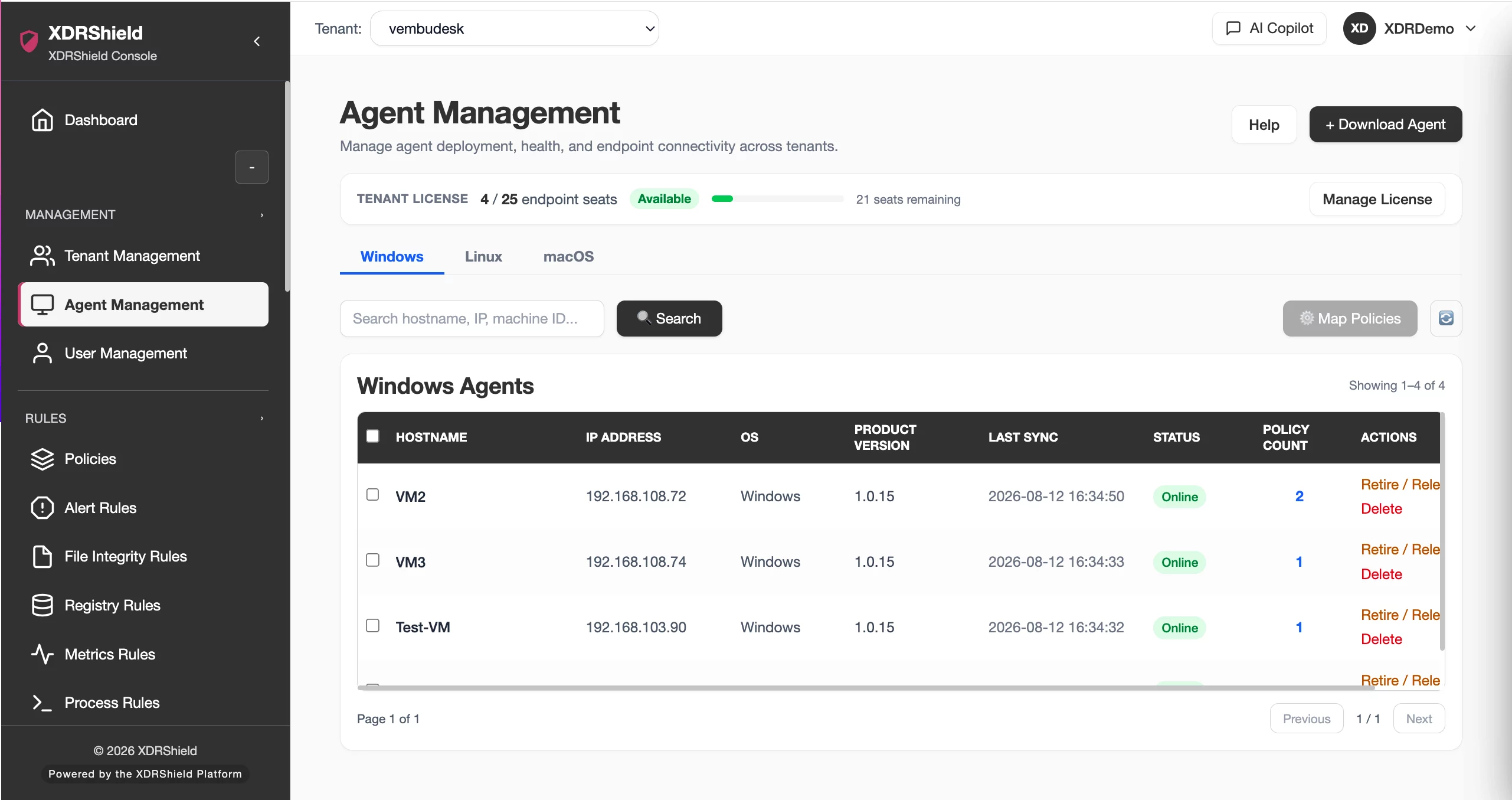
Endpoint agents need lifecycle control, not just installation links.
Security coverage depends on agents being installed, up to date, healthy, assigned to the right policies, and scoped to the correct tenant. Agent Management brings those operational checks together so teams can onboard endpoints and maintain coverage with fewer blind spots.
Manage enrolled endpoints from deployment through ongoing maintenance.
The Agent Management page brings installation, status visibility, agent version, sync state, and policy mapping into the same operator workflow. Teams can filter to the correct operating-system tab, search the endpoint table, verify last communication, and apply policies only after confirming they are working with the intended devices.
- Download supported endpoint installers and rollout instructions from the deployment drawer.
- Filter by Windows, Linux, or macOS before reviewing or bulk-managing agents.
- Search by hostname, IP address, or machine ID to narrow the endpoint table quickly.
- Review status, last sync, agent version, and policy mapping before broad changes.
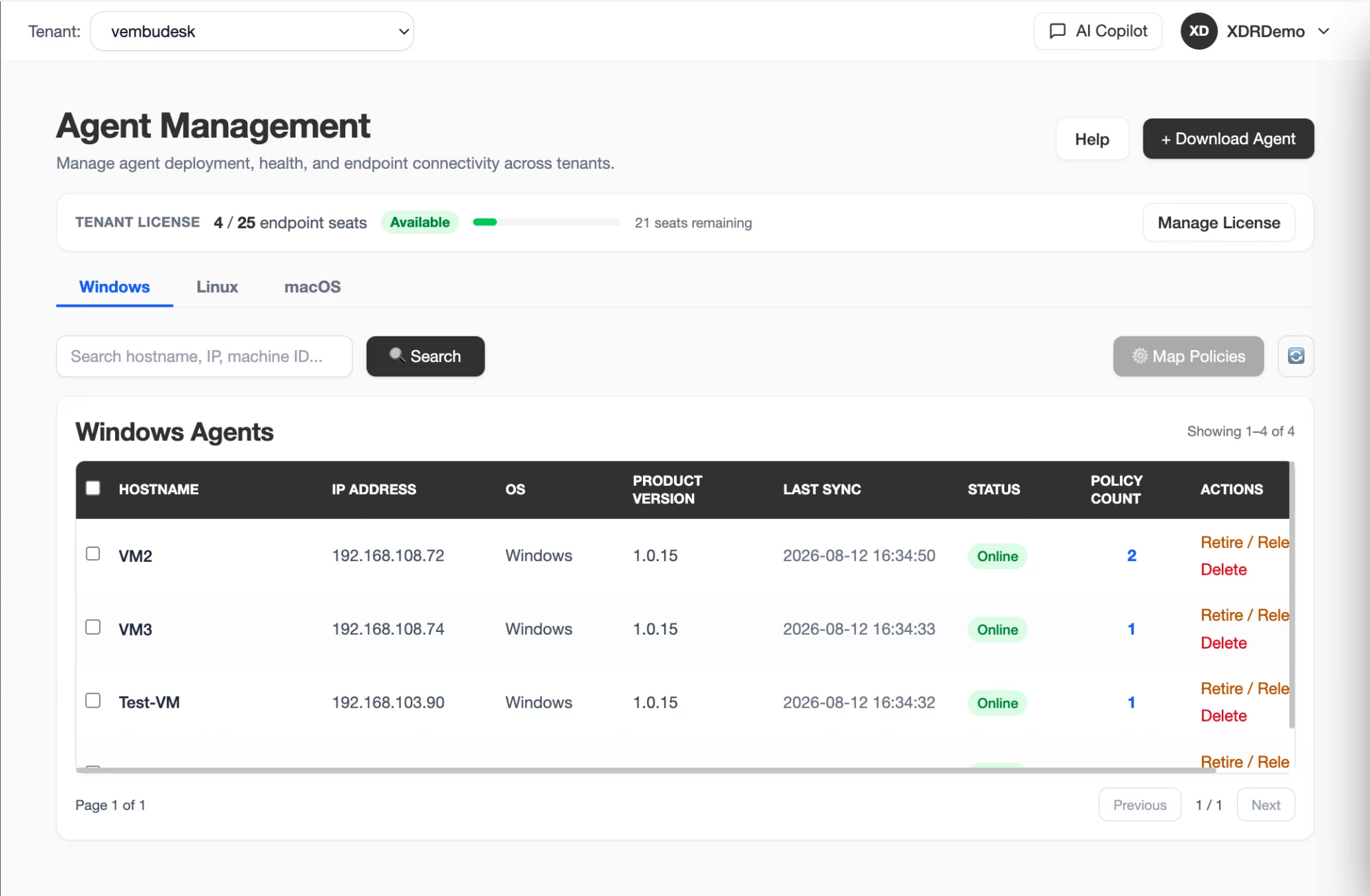
What XDRShield Agent Management helps teams do.
Each capability supports endpoint lifecycle work: deployment, verification, policy mapping, maintenance, and safe bulk operations.
Platform-specific endpoint review
Filter to Windows, Linux, or macOS before reviewing endpoint details or taking bulk actions.
Fast endpoint search
Find devices by hostname, IP address, or machine ID so operators can work from a narrow and accurate endpoint set.
Status and last-sync validation
Confirm whether a device is online and when it last communicated with the console before relying on current state.
Policy mapping control
Assign policies to one or more selected agents when onboarding groups or correcting coverage gaps.
Version and build review
Check agent build information to identify outdated endpoints, rollout drift, or compatibility issues.
Coverage readiness
Confirm agents are installed, healthy, scoped, and assigned before treating endpoint monitoring as ready.
Operational refresh
Reload the current view after deployment, policy assignment, or troubleshooting to pick up fresh heartbeat and sync changes.
Tenant-scoped management
Operate customer-separated endpoint lists so MSP teams do not mix assignments or troubleshooting work across tenants.
From endpoint onboarding to maintained coverage.
A disciplined management workflow keeps endpoint rollout, health validation, policy assignment, and ongoing maintenance connected.
Select the OS tab
Filter to the correct platform before deployment or review so instructions and compatibility assumptions are accurate.
Search and scope endpoints
Use hostname, IP address, machine ID, tenant, and status filters to limit the action set.
Check status and sync
Validate online state, last communication, and current health before troubleshooting or policy assignment.
Review version and policy
Confirm the endpoint build and mapped rule set match operational expectations.
Apply or adjust policies
Assign policies to selected agents after verifying scope and compatibility, especially during group onboarding.
Refresh and confirm
Reload the view and recheck heartbeat, sync time, and policy mapping after rollout or remediation.
Where Agent Management helps most.
Use Agent Management when endpoint lifecycle operations affect security coverage, policy deployment, or MSP service consistency.
New endpoint rollout
Download agents, enroll systems, and validate that newly added devices appear with expected status and sync behavior.
Policy assignment campaigns
Map policies across selected endpoint groups while avoiding accidental assignments outside the intended tenant or platform.
Upgrade and maintenance windows
Review version and last sync to plan agent upgrades or confirm systems recovered after maintenance.
Troubleshooting coverage gaps
Investigate endpoints that appear missing, offline, out of date, or mapped to unexpected policies.
Operational inventory review
Use agent records as a practical operating list for endpoint ownership, build status, and coverage checks.
MSP customer onboarding
Standardize deployment and policy setup across customers while keeping tenant boundaries clear.
Choose the right action for the endpoint lifecycle task.
This table separates deployment, verification, and policy actions so operators can avoid unnecessary changes.
| Area | What it means | How teams use it |
|---|---|---|
| Download Agent | Installer and rollout instructions for supported endpoint platforms. | Use during first-time onboarding or when replacing an agent installation. |
| Map Policies | Assign detection, monitoring, and control policies to selected endpoints. | Use after platform, tenant, status, and policy compatibility are confirmed. |
| Refresh | Reload endpoint status, heartbeat, sync, and policy details. | Use after deployment, assignment, service restart, or troubleshooting. |
| Search/filter | Narrow the table by host, IP, machine ID, platform, tenant, or state. | Use before bulk actions to avoid touching the wrong endpoints. |
Agent management for IT, SOC, and MSP teams.
The same management view supports onboarding, coverage assurance, investigation readiness, and customer-separated operations.
For IT and security administrators
Use Agent Management to deploy agents, confirm health, check versions, and map policies to compatible endpoints.
- Validate platform and build before policy assignment.
- Use status and last sync before investigating missing coverage.
- Refresh after deployment or policy changes to confirm the result.
For MSP and service-provider teams
Use tenant-scoped endpoint lists to onboard customer environments, maintain policies, and troubleshoot without mixing customer data.
- Separate endpoint operations by customer and workspace.
- Standardize rollout checks across tenants.
- Preserve operational accountability during bulk changes.
Agent Management FAQs.
What is Agent Management in XDRShield?
Agent Management is the endpoint lifecycle view for enrolled devices. It brings together deployment, status, last sync, version review, search, filtering, and policy mapping.
What should operators check before assigning policies?
Operators should confirm the correct tenant and platform, search to the intended endpoint set, check online and last-sync state, and review agent version and existing policy mapping.
Can agents be managed across Windows, Linux, and macOS?
The management view supports platform-aware filtering and deployment context. Specific capabilities depend on supported operating system, agent version, and release availability.
How does Agent Management relate to Agent Health Monitoring?
Agent Management focuses on lifecycle and policy assignment. Agent Health Monitoring focuses on reporting continuity, availability history, downtime gaps, and health-state filtering.
How does this support MSP operations?
MSP teams can manage endpoint onboarding, status review, and policy mapping within tenant-scoped views so customer operations remain separated and auditable.
Manage agents from deployment to policy readiness.
Use XDRShield Agent Management to deploy endpoint agents, validate health and sync, review versions, and assign policies with operational confidence.












