
See every installed package and every known vulnerability across your endpoints.
XDRShield Endpoint Inventory and Vulnerability Visibility collects installed software from monitored endpoints, matches packages against known CVE databases, and gives security teams host-level inventory, catalog-wide software spread, severity-filtered vulnerability triage, and CSV export for patch planning and compliance evidence.
You cannot protect what you cannot inventory, and you cannot prioritize what you cannot rank by risk.
Endpoint software inventory and vulnerability detection are the foundation of attack surface management. Teams need to know what software is installed, where it is installed, which versions are vulnerable, and which hosts carry the highest exposure before they can plan remediation or prove compliance.
Collect installed software, match against CVE databases, and review exposure with full asset context.
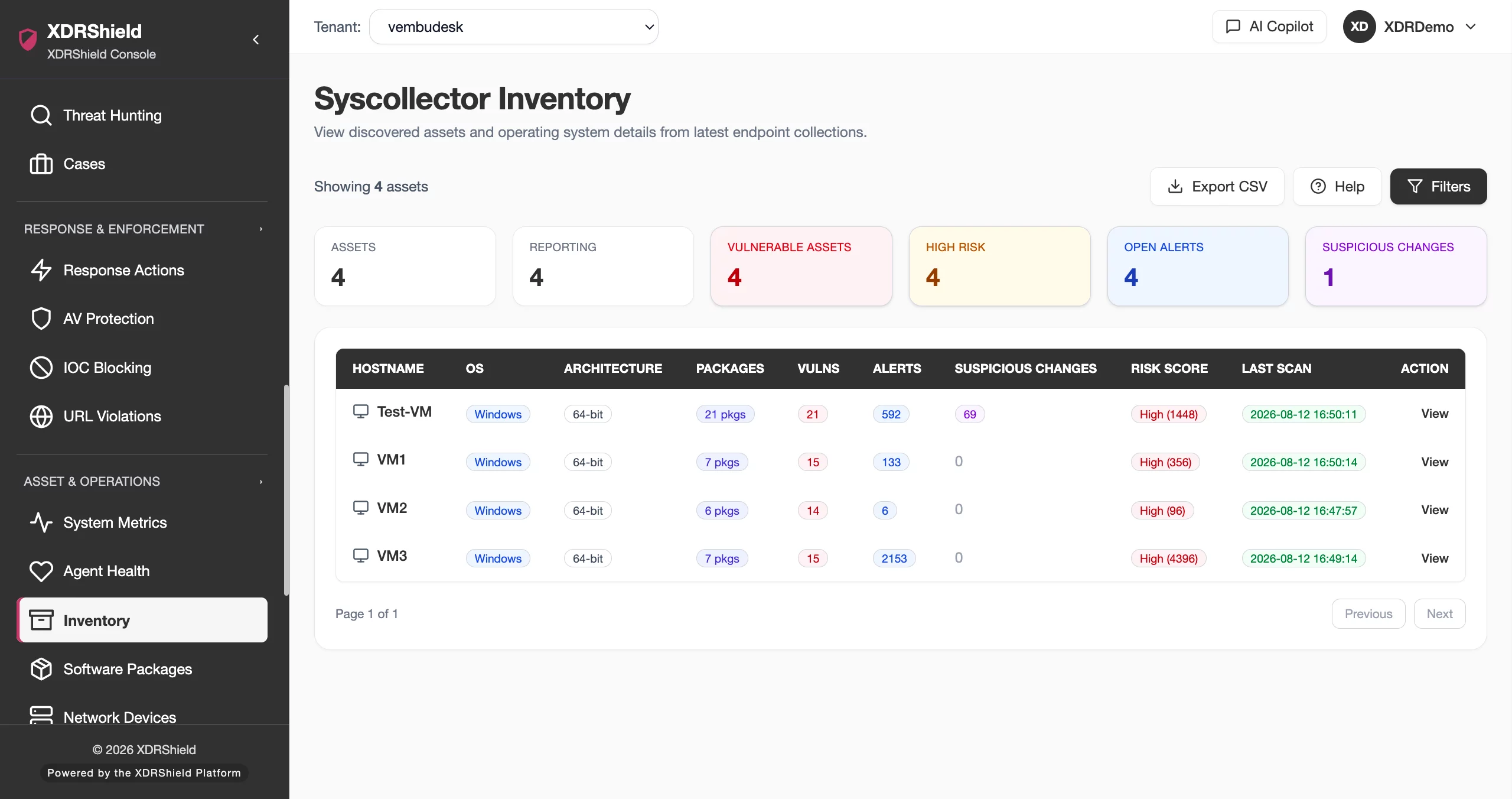
The endpoint agent collects installed package data from monitored hosts and reports it to the tenant workspace. XDRShield matches installed software against known CVE databases to surface vulnerabilities by severity. Teams can review packages by host in inventory view, switch to catalog view for software prevalence and version spread, and drill into vulnerability findings with per-asset context.
- Endpoint agent collects installed package data during scheduled scans and baseline collections.
- Installed software is matched against known CVE databases for vulnerability detection.
- Inventory view shows packages by host; catalog view groups packages by name and version across all hosts.
- Vulnerability findings include severity, CVE ID, affected software, and host drilldown with alert and software context.
What XDRShield Endpoint Inventory and Vulnerability Visibility helps teams do.
Each capability supports a part of the inventory and vulnerability workflow, from software collection and catalog analysis to CVE triage, asset drilldown, and reporting.
Installed packages inventory
Review installed software organized by host with package name, version, and vulnerability count. See what is installed on each endpoint across the tenant.
Catalog view and software spread
Switch to catalog view to group packages by name and version across all hosts. Measure software prevalence, version spread, and at-risk host counts.
Vulnerability detection
Match installed software against known CVE databases. Summary cards show total findings, distinct CVEs, critical and high counts, and the most exposed CVE.
Severity filtering
Filter vulnerabilities by critical, high, medium, or low severity. Narrow triage scope to focus remediation where exploit impact is highest.
Risk-aware host filters
Filter hosts by vulnerable status, critical or high exposure, and open-alert pressure to prioritize endpoints with the greatest combined risk.
Asset drilldown
Click a CVE to open per-asset drilldown with host context, installed software details, and related alerts. Continue into software and alert links without losing context.
CSV export for reporting
Export filtered CVE data as CSV for ticketing, patch planning, compliance evidence, or audit workflows. Asset drilldown links connect findings to software context.
Software spread tracking
Use catalog view to identify packages with high host spread and version concentration. Confirm rollout reach and detect unauthorized or outdated software.
From inventory review to vulnerability triage and remediation validation.
A strong inventory and vulnerability workflow keeps software visibility, risk filtering, CVE triage, asset drilldown, and reporting connected so teams can prioritize and validate remediation consistently.
Review inventory
Start in inventory view for host-by-host package context. See what software is installed across the tenant and identify outdated or unexpected packages.
Filter by risk
Apply risk filters — vulnerable hosts, critical or high exposure, open-alert hosts — to surface endpoints with the greatest combined pressure.
Check vulnerabilities
Review exposure summary cards and filter CVEs by severity. Search by CVE ID or software name to narrow triage scope and identify the most exposed findings.
Drill into assets
Click a CVE to open per-asset drilldown. Review host context, installed software details, and related alerts to validate exposure and plan remediation.
Export for reporting
Export filtered CVE data as CSV for ticketing, patch planning, compliance evidence, or audit workflows with full asset and severity context.
Validate remediation
Use Scan Now, Quick Baseline, or Full Catalog Sync after patching to confirm vulnerability closure and verify that remediation reached expected endpoints.
Where Endpoint Inventory and Vulnerability Visibility helps most.
Use inventory and vulnerability data where software visibility, CVE triage, compliance evidence, or risk concentration decisions matter.
Patch validation
Confirm that patch rollout reached expected hosts and validate vulnerability closure with rescan after remediation.
Vulnerability triage
Review newly synced CVEs after catalog updates, filter by severity, and prioritize affected assets by host context and open alert pressure.
Software license compliance
Use catalog view to identify installed software by name and version across hosts for license tracking and renewal planning.
Unauthorized software detection
Review inventory by host to identify unexpected or unapproved packages and investigate endpoints with unknown software installations.
Risk concentration assessment
Find package versions with high host spread and high vulnerability concentration to prioritize updates that reduce exposure across many endpoints.
MSP multi-tenant software governance
Review software inventory and vulnerability exposure across managed customers while keeping tenant-specific data separated by customer and workspace.
Two perspectives on the same software data.
Inventory view and catalog view show the same collected package data from different angles so teams can answer both per-host and tenant-wide questions.
Inventory View
Software by host
Catalog View
Software by package
Endpoint inventory for security, infrastructure, and MSP teams.
The same inventory and vulnerability data supports different decisions. XDRShield keeps software context, CVE findings, and asset drilldown usable without losing tenant scope or operational responsibility.
For SOC and investigation teams
Use vulnerability findings to prioritize asset investigation, correlate CVE exposure with alerts and event triage, and escalate high-risk hosts into hunting and case workflows.
- Connect vulnerability exposure to security alerts and event context.
- Drill from CVE findings into asset details and related alerts.
- Escalate high-risk hosts into threat hunting and case investigation.
For MSP and IT operations teams
Review software inventory and vulnerability exposure across managed customers while keeping tenant-specific data separated by customer, tenant, and workspace scope.
- Apply consistent risk filters across customers and tenants.
- Keep tenant-specific inventory and vulnerability data separate.
- Export filtered CVE data for per-customer patch planning and reporting.
Endpoint Inventory and Vulnerability Visibility FAQs.
What is Endpoint Inventory and Vulnerability Visibility in XDRShield?
Endpoint Inventory and Vulnerability Visibility provides tenant-wide software inventory and vulnerability detection across monitored endpoints. Teams can review installed packages by host, filter by vulnerability severity, and drill into asset-level exposure without leaving the vulnerability context.
How does the inventory view differ from the catalog view?
Inventory view shows packages organized by host, so teams can see what is installed on each endpoint. Catalog view groups packages by name and version across all hosts, showing prevalence and version spread to identify software footprint and at-risk host counts.
What vulnerability information does XDRShield collect?
XDRShield matches installed software against known CVE databases to surface vulnerabilities by severity. Summary cards show total findings, distinct CVEs, critical and high counts, and the most exposed CVE. Teams can filter by severity, search by CVE or software, and drill into affected assets.
Can vulnerability data be exported for reporting?
Yes. Filtered CVE data can be exported as CSV for ticketing, patch planning, compliance evidence, or audit workflows. Asset drilldown links connect vulnerability findings to software context and related alerts.
How does endpoint inventory support MSP operations?
MSP teams can review software inventory and vulnerability exposure across managed customers while keeping tenant-specific data separated by customer, tenant, and workspace scope. Risk filters help prioritize remediation across the managed environment.
See every package, rank every CVE, and prioritize remediation with confidence.
Use XDRShield Endpoint Inventory and Vulnerability Visibility to monitor installed software, detect vulnerabilities by severity, drill into affected assets, and export CVE data for patch planning and compliance.












