
Centralize detection rule management with reusable, OS-matched security policies.
XDRShield Policy Management lets administrators create reusable policy definitions that group File Integrity Monitoring, Registry, Process, IOC, AV, URL Filtering, and Metrics rules by operating system, then assign those policy bundles to endpoints through Agent Management for synchronized enforcement.
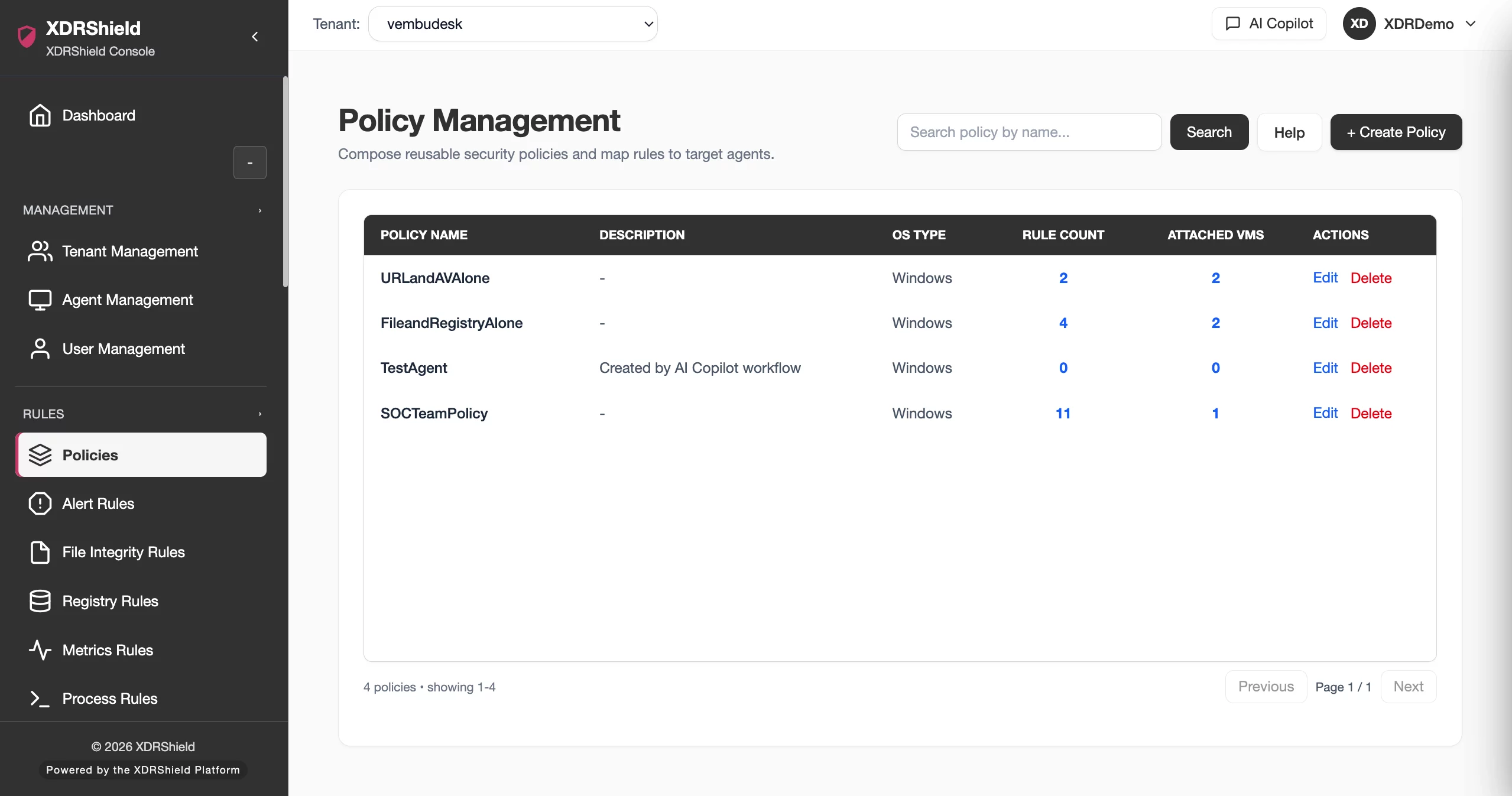
Reusable policies turn scattered detection rules into standardized, assignable endpoint protection.
Individual rules are powerful, but managing them as isolated definitions creates coverage gaps, duplication, and inconsistent enforcement. Policy Management bundles rules into focused, OS-matched sets that administrators can search, edit, validate, and assign to agents across tenants.
Rules are created per module, bundled into policies, and assigned to agents for endpoint enforcement.
Detection rules — File Integrity Monitoring, Registry monitoring, Process monitoring, IOC blocking, AV protection, URL filtering, and Metrics collection — are created within their respective rule modules. Policy Management groups selected rules into a named policy definition filtered by operating system. The policy is then assigned to one or more agents through Agent Management, which delivers the combined rule set to endpoint agents for enforcement, telemetry collection, and event reporting.
- Create and maintain rules in each rule module: FIM, Registry, Process, IOC, AV, URL Filtering, and Metrics.
- Bundle selected rules into a named policy with OS filtering for Windows, Linux, or macOS.
- Validate rule count and scope before assignment to keep policies focused and debuggable.
- Assign policies to agents from Agent Management for synchronized endpoint enforcement.
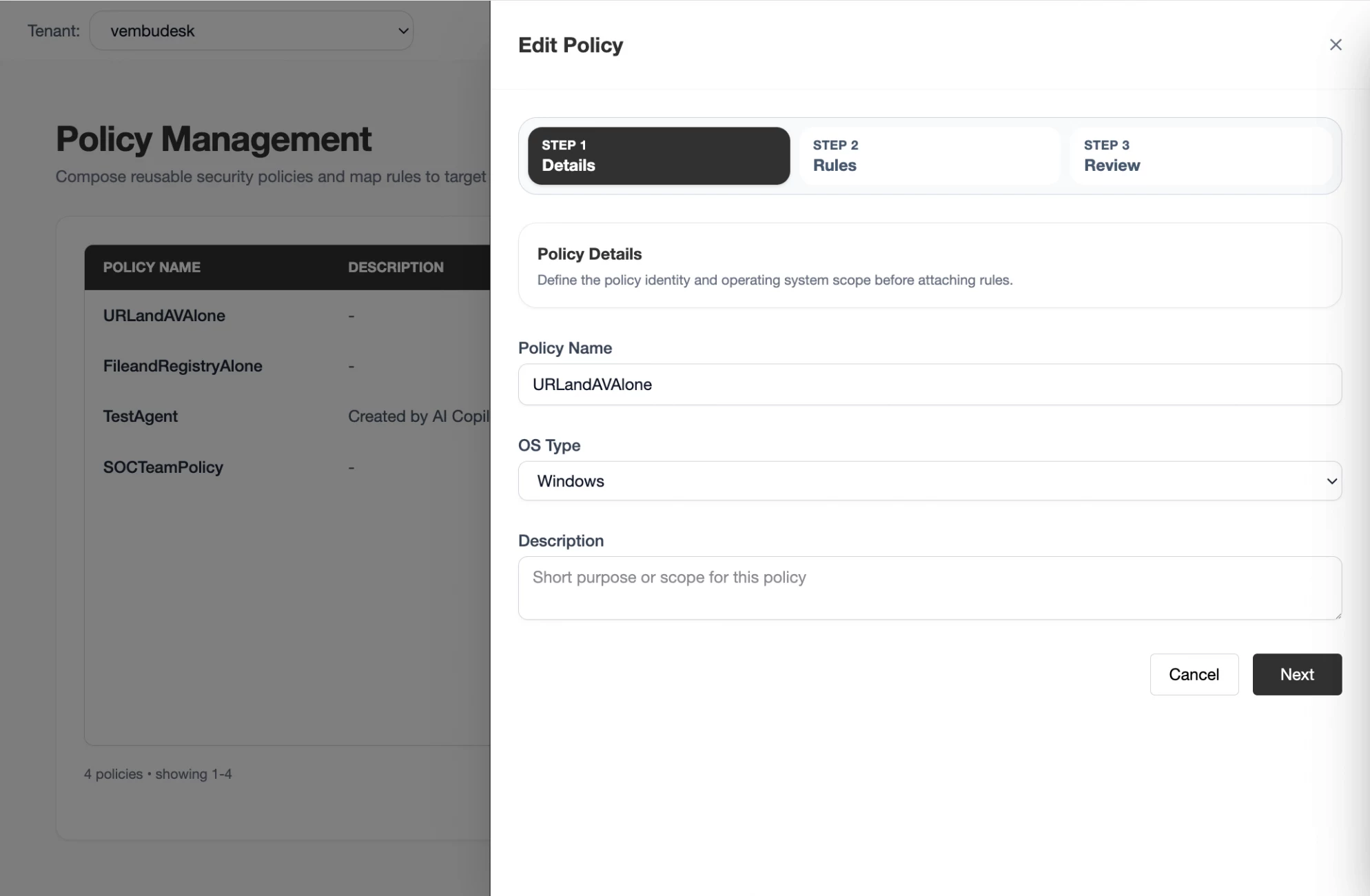
What Policy Management helps teams do.
Each capability supports part of the policy lifecycle, from rule creation and bundling to OS filtering, search, validation, and agent assignment.
Policy creation and bundling
Combine multiple rule types into a single named policy definition so administrators manage one operational unit instead of individual rules across disconnected modules.
OS-specific rule matching
Select Windows, Linux, or macOS when creating a policy. The rule selector only shows rules compatible with that operating system, preventing platform mismatches.
Rule type coverage
Policies can include FIM, Registry, Process monitoring, IOC blocking, AV protection, URL filtering, and Metrics rules, giving each endpoint a complete detection and enforcement bundle.
Policy search and dedup
Search existing policies by name before creating a new one to avoid duplicating similar rule bundles and maintain a clean, auditable policy catalog.
Edit and refine policies
Open any policy to add, remove, or adjust rules when monitoring needs change. Edits flow to assigned agents on the next synchronization cycle.
Rule count validation
Review the number of rules in each policy before assignment. Policies that are too broad create noisy events; focused policies are easier to assign, test, and troubleshoot.
Agent assignment integration
Policies are assigned to endpoints through Agent Management. After validation, map a policy to individual agents or agent groups so each endpoint receives the combined rule set.
Policy standardization across tenants
Create and assign policies per tenant while keeping each customer’s rule sets, policy assignments, and agent configurations separated by tenant scope.
Rule types and what they control.
Each policy can bundle rules from every detection and enforcement module. Understanding what each rule type monitors helps administrators build complete, focused policy bundles.
From rule selection to synchronized endpoint enforcement.
A disciplined policy workflow keeps rule selection, OS matching, scope validation, and agent assignment connected so enforcement is consistent, traceable, and easy to maintain.
Search existing policies
Check whether a similar policy already exists before creating a new one to avoid duplication and keep the policy catalog clean.
Define the OS
Select Windows, Linux, or macOS so the rule selector only shows compatible rules for that platform.
Select rules
Add only meaningful rules that belong together operationally — FIM, Registry, Process, IOC, AV, URL Filtering, or Metrics — to keep the policy focused.
Validate scope
Review rule count and coverage. Split overly broad policies into smaller, purpose-driven sets that are easier to assign and troubleshoot.
Assign to agents
Map the validated policy to individual agents or agent groups from Agent Management so endpoints receive the combined rule set.
Review coverage
After assignment, verify that enforcement, telemetry, and events from assigned agents match the policy intent and adjust rules as needed.
Where Policy Management helps most.
Use focused policy bundles to standardize detection, enforcement, and monitoring across endpoint groups, customers, and operating environments.
Baseline endpoint hardening
Create a baseline policy with FIM, Registry, and Process rules that every endpoint must enforce before additional monitoring is layered on.
Compliance mapping
Bundle rules that map to specific compliance frameworks so auditors can verify required monitoring is active across in-scope endpoints.
Endpoint standardization
Deploy consistent detection coverage across Windows, Linux, and macOS endpoints with OS-filtered policies that prevent platform mismatches.
MSP cross-customer consistency
Apply the same baseline policy across managed customers while keeping tenant-specific rules, events, and assignments separated.
Incident-driven policy updates
Rapidly add new IOC, Process, or URL filtering rules to an existing policy after an incident, then synchronize updated enforcement to assigned agents.
Audit-ready rule documentation
Maintain clear policy names, focused rule sets, and documented scope so every enforcement decision is traceable during audits and reviews.
Policy management for security, infrastructure, and MSP teams.
The same policy framework supports different decisions. XDRShield keeps rule context, OS filtering, and agent assignment usable without losing tenant scope or operational responsibility.
For SOC and security teams
Build focused policies that combine detection and enforcement rules, assign them to endpoints, and maintain clear audit trails for every rule change and assignment decision.
- Combine FIM, Registry, Process, and IOC rules into unified enforcement bundles.
- Validate rule count and scope before deploying to production endpoints.
- Update policies rapidly when new threats or detection needs emerge.
For MSP and IT operations teams
Standardize policies across managed environments while keeping each customer’s rule sets, agent assignments, and event queues separated by tenant scope.
- Apply consistent baseline policies across customers and tenants.
- Keep tenant-specific rules, events, and audit history separate.
- Use policy search to avoid duplication across customer environments.
Policy Management FAQs.
What is Policy Management in XDRShield?
Policy Management lets administrators create reusable policy definitions that group multiple monitoring and enforcement rules by operating system, then assign those policy bundles to endpoints through Agent Management.
How do rules map to policies in XDRShield?
Each policy bundles rules from modules such as File Integrity Monitoring, Registry monitoring, Process monitoring, IOC blocking, AV protection, URL filtering, and metrics collection. Rules are filtered by OS type so only compatible rules appear for each platform.
How does OS filtering work for policies?
When creating a policy, administrators select Windows, Linux, or macOS. The rule selector only shows rules compatible with that operating system, preventing mismatched rule assignments and reducing deployment noise.
How are policies assigned to endpoints?
Policies are assigned through Agent Management. After a policy is created and validated, administrators map it to individual agents or agent groups so the endpoint agent receives the combined rule set for enforcement.
Can MSPs manage policies across multiple customers?
Yes. MSP teams can create and assign policies per tenant while keeping each customer’s rule sets, policy assignments, and agent configurations separated by tenant scope.
Bundle detection rules into focused, OS-matched policies and synchronize enforcement across endpoints.
Use XDRShield Policy Management to create reusable rule bundles, filter by operating system, validate scope, and assign policies to agents for synchronized endpoint detection and enforcement.












